In Part 1 you set up your chat so that Claude knows who you are, you built a couple of Projects, and you learned to argue with the first answer instead of accepting it. If you did that, you already think with Claude rather than just query it. This is the next room.
Here is the one fact that changes everything in this part, the way "it re-reads the whole conversation" was the spine of Part 1: in chat, Claude answers. In Cowork, Claude acts. It stops being an analyst who writes you a reply in a box and becomes one who opens your folder, reads the actual files, builds the actual deck, and hands you the finished thing. It has hands now.
That one shift, from answering to acting, is the spine of this whole guide. Once you hold it, every habit below stops being a tip and becomes obvious. Let me show you why, give you the setup that makes it safe, then run one real job, building a quarterly review deck from a data export, through it start to finish so you can see the gap between how most people will use this and how it actually pays.
This is Part 2. Cowork is the room where the work gets built. It assumes Part 1 (Chat) is already a habit, because the context you set there carries straight up into here. Part 3 is Code, where you turn a workflow you have built by hand into something a whole team can run. The map of all three is at the end.
Did you know? Cowork is the newest of the three ways to work with Claude, after Chat and Code. Once people saw that Claude Code's agentic engine could do far more than write software, Anthropic brought that same engine into the desktop app where Chat already lived, in a form built for non-coders. Cowork is not a new brain. It is Code's ability to act, made approachable, sitting right next to the Chat you already know.
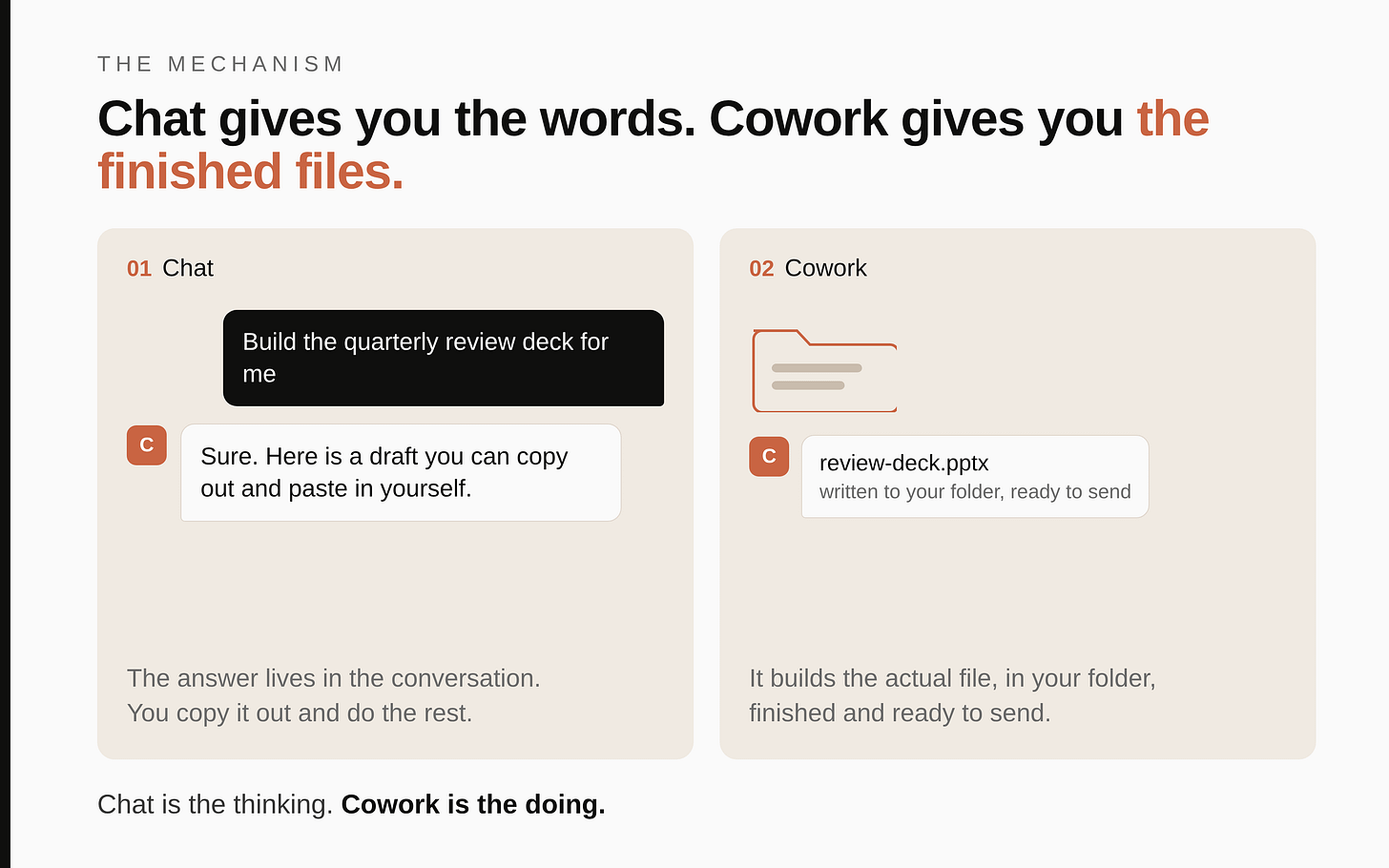
The mechanism that explains everything
Picture the same brilliant analyst from Part 1. In chat, they sit across a table and talk: you ask, they answer, nothing leaves the table. In Cowork you have handed that same analyst a desk, a filing cabinet, and the keys to one room. Now they can pull the real file out of the cabinet, work on it, and put a finished document back. The intelligence is identical. What changed is that it can now touch things.
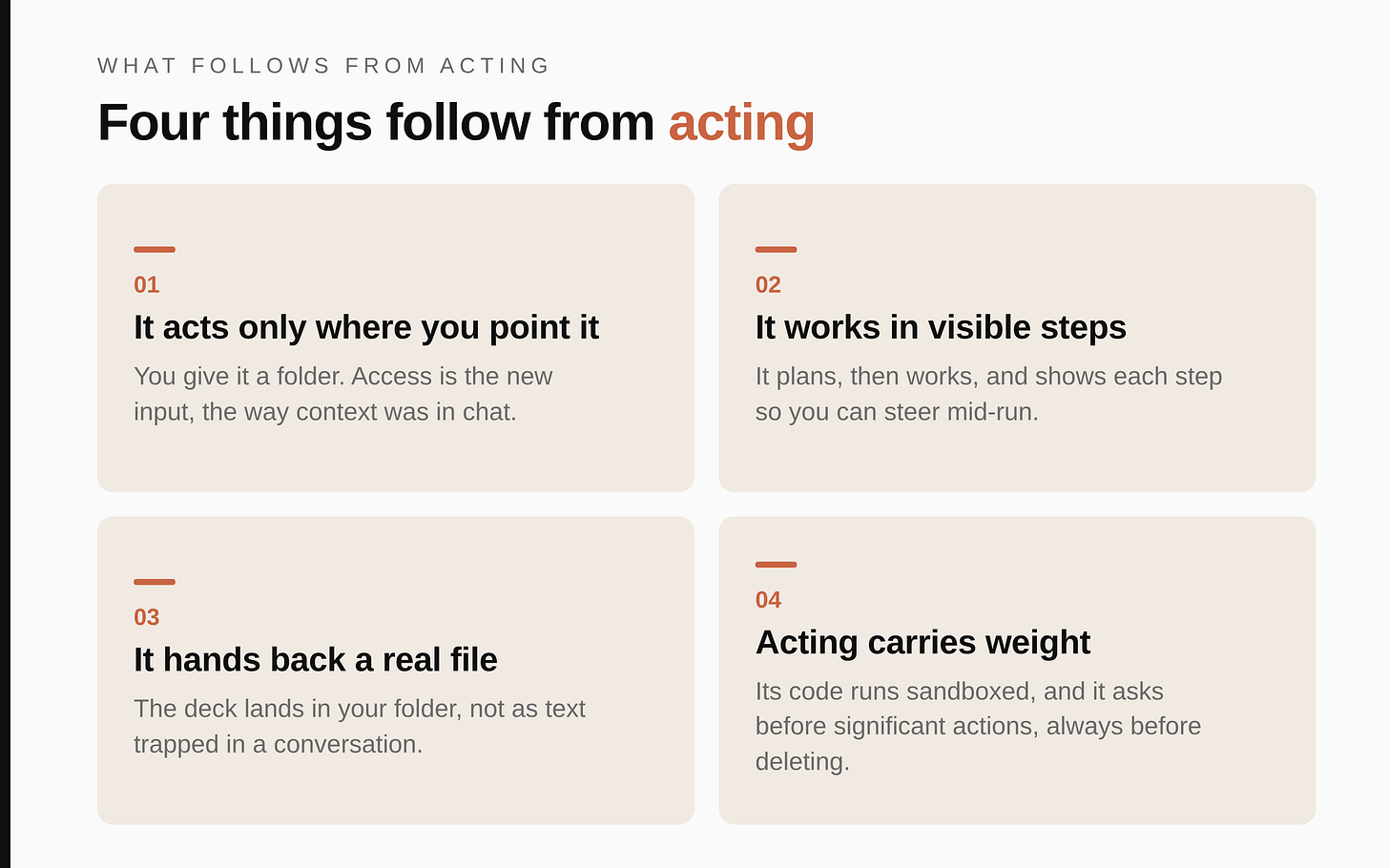
Four things follow directly, and they are the whole game.
1. It only acts where you point it. In chat, context was the input. In Cowork, access is the input. Claude can read and change exactly the folder you give it, and nothing else on your computer. Point it at one working folder and it sees those files; it cannot see the rest of your drive. So the first move is always the same: decide which folder this job lives in, and give it that one. A vague job in the wrong folder gets you a vague result, the same way an empty brief did in chat.
2. It works in visible steps, and you can steer. Claude does not answer in one shot. It makes a plan, then works through it: read the export, find the right columns, build the slides, check the totals. It shows you each step as it goes. This is the part people miss. You are not waiting for a black box to finish, you are watching an analyst work and you can interrupt the moment it goes the wrong way. The skill is no longer writing the perfect prompt. It is briefing well, watching the plan, and correcting in flight.
3. The output is a real file in your folder. Chat can also hand you a file to download, so this is not about chat being text-only. The difference is where the file lives and what Claude does with it. In Cowork the deck lands directly in the folder you chose, built from and saved alongside your other files, and Claude keeps working on that same file across a long job rather than regenerating it from scratch. The deck is a .pptx in your folder, the model an .xlsx with working formulas, the summary a .docx, each sitting where you will actually look for it instead of buried in a conversation you have to dig back into. When the deliverable is a real file you will open, edit, and reuse, build it where your files live.
4. Acting carries weight that answering did not. A wrong sentence in a chat is harmless, you just read past it. A wrong number in a built deck looks finished and authoritative, and it can travel into a board pack before anyone checks it. Claude can also create, move, and overwrite files. So everything from Part 1 about never trusting unverified output still holds, with higher stakes, plus two new safeguards built into the tool: it runs its code in a sealed sandbox that cannot touch your operating system, and it asks your permission before significant actions and always before deleting anything. Acting is more powerful and less forgiving. Treat it that way.
Keep those four in your head. Everything below is just acting on them.
"Cowork does the legwork. You stay the judge."
Two things that make Cowork powerful
In Part 1 the two machines were instructions and memory, the things that make Claude know you. In Cowork two things do the heavy lifting. One is genuinely new here; the other you may already have met in chat, but it earns its keep in Cowork because this is where the real file gets built.
The workspace is the folder you hand it. This is access. When you start Cowork you select a folder on your computer, and that becomes the room Claude works in. It can read every file in it, change them, and save new ones there. Choose the folder deliberately: it should hold the inputs the job needs and nothing sensitive the job does not. The folder is to Cowork what the brief was to chat. Get it right and everything downstream is grounded in your real files.
Skills are packaged competence. A skill is a pre-built set of know-how that Claude loads when a job calls for it, so it does not improvise from scratch. There are skills that build proper PowerPoint decks, skills that build Excel files with real formulas, skills that produce clean Word documents. Many organisations build their own branded skills too: ones that produce a deck or a document already in the right colours, fonts, and logo. Skills are not unique to Cowork, they work in chat too, but they pay off most here, because Cowork is where Claude actually builds the file the skill knows how to make. You do not have to know they exist by name. When you ask for a branded deck, Claude reaches for the right one. But knowing the category exists changes what you think to ask for.
Everything you set in Part 1 still applies underneath. Your instructions about how to write and what never to claim, your memory, and your Projects all carry into Cowork. Cowork adds two things on top: global and folder instructions (standing orders for every session, and standing orders for a specific folder) so you can tell Claude, once, how this particular workstream should always be handled. We will set both below.
When to reach for Cowork, and when to stay in chat
Part 1 gave you the test from the chat side. Here it is from the Cowork side, because the failure mode now is the opposite: people who discover Cowork start running everything through it, including things chat does faster.
Stay in chat when the work is thinking. Deciding, drafting, pressure-testing a view, summarising a meeting, writing a narrative. That is most days, and chat is quicker for it because there is no folder to set up and no files to build.
Move to Cowork when the job is shaped for it. Anthropic's own best-practices guidance gives a five-point test, and it is the sharpest one I have seen. You do not need all five; a good candidate hits a few.
- Several inputs feed it. Multiple files, a whole folder, or a file plus a connector. If there is genuinely one small input, chat usually handles it.
- It produces a file. You need a deliverable someone will open, present, or build on: a deck, a model, a document.
- It recurs. One-offs are fine, but repeating work is the sweet spot, because you can turn it into a template or put it on a schedule.
- You can judge the result fast. You can glance at the output and tell in fifteen seconds whether it is right, wrong, or part way there. This is what makes delegation safe: you stay the judge.
- The middle is mechanical. The thinking lives at the start (deciding what you want) and the end (deciding if it is right). The grind in between, extract, reconcile, reformat, is what you hand off.
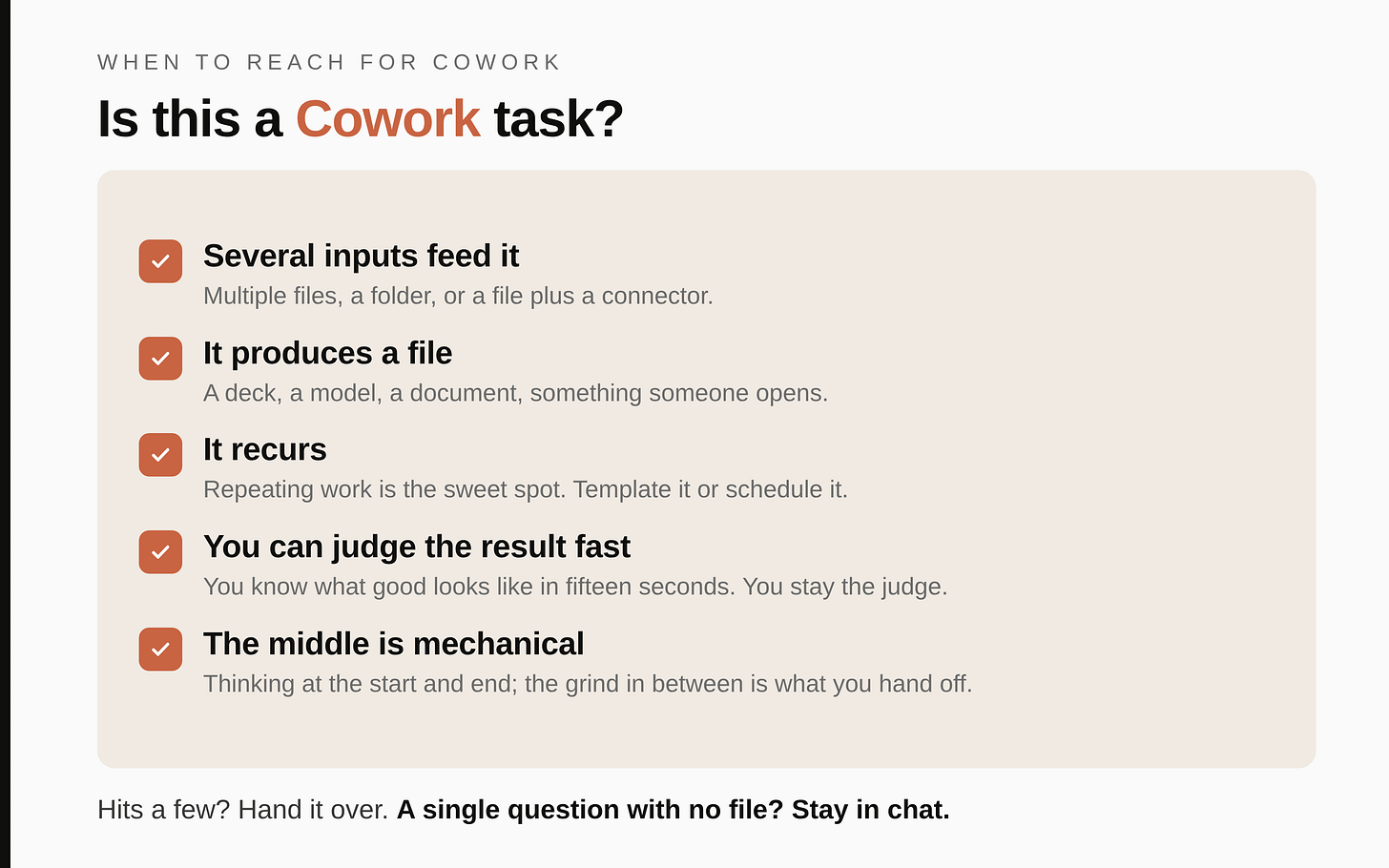
The quarterly review deck hits all five: the data export plus your reference files go in, a deck comes out, you build it every quarter, you know exactly what a good one looks like, and the middle (pulling rows, computing variances, laying out slides) is pure grind. That is why it is the textbook Cowork job.
Here is where the line falls on jobs you do often.
| The job | Room |
|---|---|
| What should I cover in the quarterly review? | Chat |
| Read the last three months of notes in this folder and build the review deck on our template | Cowork |
| How should I structure a variance flag? | Chat |
| Clean these twelve exports, standardise the columns, and merge them into one master sheet | Cowork |
| Pressure-test my pricing logic | Chat |
| Build the one-pager per region and the consolidation spreadsheet from this folder | Cowork |
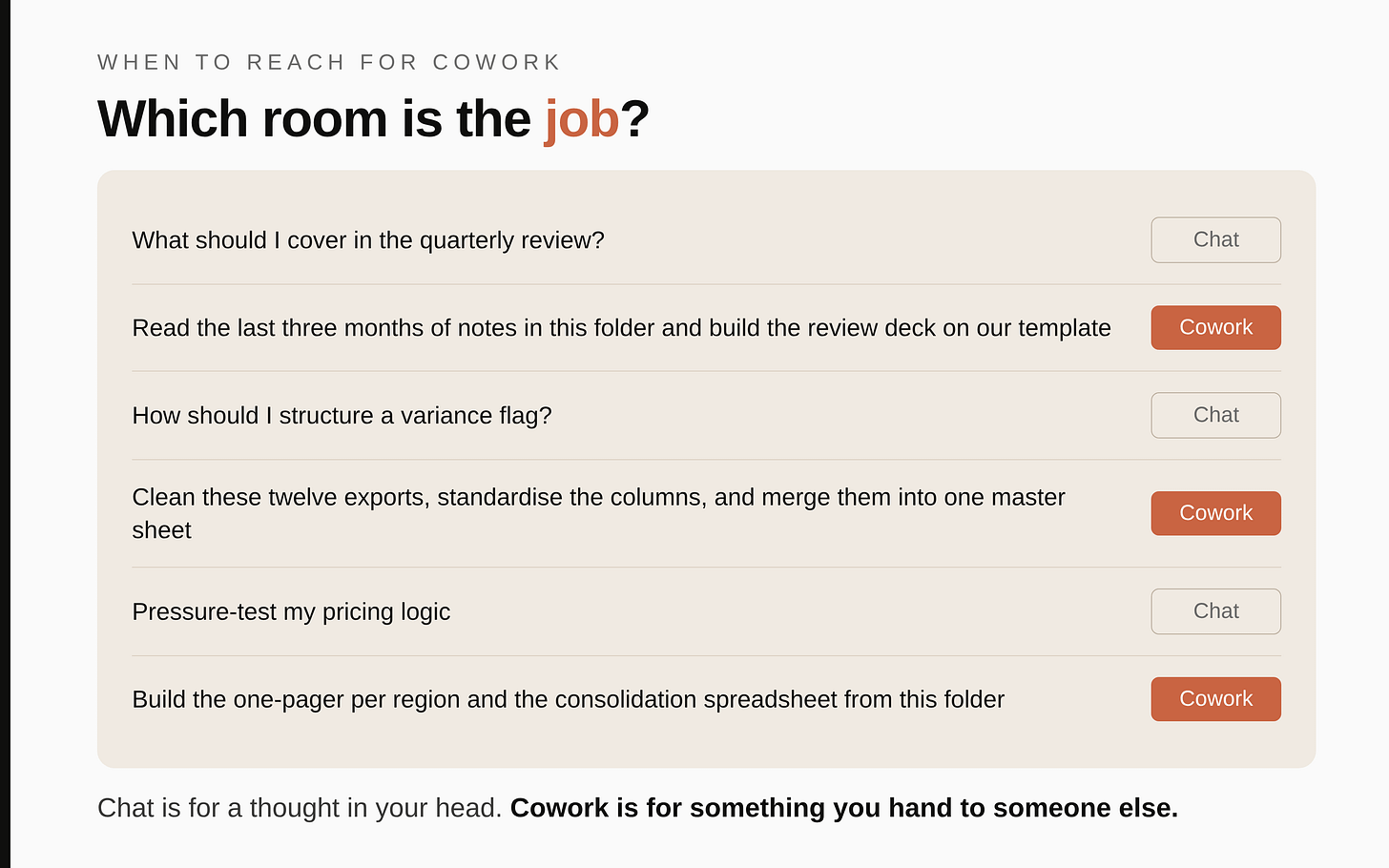
The common mistake is reaching for chat for everything and never feeling the difference. The opposite mistake is running single questions through Cowork and waiting on a workspace for something chat answers in five seconds. Cowork spins up that workspace and uses more of your usage allowance to do it, so do not pay that cost to ask what you could have asked in a sentence. The clean rule: chat is for when the output is a thought in your head, Cowork is for when the output is something you will hand to someone else.
Short version. Chat is you asking. Cowork is the two of you building. Code is it running while you sleep. Same intelligence, rising autonomy.
Set it up once. Here is the exact sequence.
Cowork lives in the Claude desktop app, not the browser. It will not appear at claude.ai. So the one-time setup is real but small.
- Install or update the desktop app. Cowork runs in Claude Desktop for macOS or Windows, on a paid plan. If you already have the app, make sure it is the latest version. On a managed work account this is the step most likely to be gated, see the honesty box at the end.
- Open the Cowork tab. In the desktop app there is a mode selector with Chat and Cowork. Click Cowork. You are now in the place where tasks run, not chats.
- Select your folder. Point Claude at the folder this job lives in. This is the access decision from the mechanism. Start with one real working folder, not your whole drive.
- Set your global instructions once. In Settings, Cowork, there is a field for global instructions that load into every Cowork session. This is the Part 1 profile block, adapted for a tool that now builds files. Paste the block below and change the specifics.
Role: I am a [your role]. I own [your area], my work runs on [the main inputs you
work from], and my readers are [who you produce things for]. A core part of my job is
[the one thing that defines it, e.g. bringing teams along, deciding under uncertainty].

How to work with me in Cowork:
- Before you build anything substantial, show me your plan and the files you intend to
  touch, and wait for me to confirm.
- Lead with the result. Be direct and critical. Challenge weak logic, do not agree by
  default.
- Trace every number to its source cell or file. Never invent a figure, source, or
  quote. If the source does not support a number, stop and tell me.
- Produce board-ready outputs: short, no filler, no motivational language, no em dashes.
- When a task is ambiguous, ask the one question that most changes the result before
  you start, rather than guessing and building the wrong thing.
- Treat everything as confidential to my organisation unless I say otherwise.
Keep this lean. It loads before every task, so a wall of text crowds out the actual job. A tight block of standing orders beats a long one, the same way a tight profile beat a long one in chat.
- Set folder instructions for the workstreams you repeat. When you are working in a specific folder, you can give Claude instructions that apply only there. Put the standing rules for that workstream in them: the source files, the way the data is cut, the house style for that deliverable. This is the same idea as Project instructions in chat, one level closer to the files.
Two minutes of setup, paid back on the first real job. The global block makes every session start from your standards; the folder instructions make each workstream start from its own.
Skills: the competence you can call on
This is the part most people never discover, and it is why their Cowork outputs look generic. Out of the box, asked to "make a deck," Claude will build a perfectly reasonable but plain one. The branded, properly structured output you actually want comes from a skill.
Think of skills the way you think of the specialists around you. You do not explain how to format a contract to your legal colleague every time; they hold that craft. A skill is the same: packaged know-how Claude loads when the job calls for it. You mostly do not invoke them by name. You describe the outcome, and Claude reaches for the right one. But knowing the categories exist changes what you ask for.
The ones most managers will use:
- Branded presentations. Ask for a branded deck and Claude builds it in the right colours, fonts, and logo, in a proper slide structure, not a generic template. This is what turns a deck job from "a deck" into "our deck."
- Branded documents. The same for Word: a strategy note, a one-pager, a leadership update, in your house style with the right footer already on it.
- Spreadsheets with working formulas. Real Excel with VLOOKUPs, conditional formatting, and multiple tabs, not a flat CSV you then have to repair.
- Domain skills. Teams build skills for their own recurring work, for example a guided brief for a particular kind of project. If your job touches that space, ask and Claude will use it.
You can also organise sets of skills, connectors, and helpers into a plugin, a single package tailored to a role. That is how a whole team toolkit eventually gets shared so everyone starts from the same standard. For now, the thing to hold is simpler: when you want a polished, on-brand file, say so explicitly, and Claude will use the skill that produces it.
Projects: the recurring-work habit, one level up
Part 1 made the case for Projects in chat. Cowork has its own Projects, and for the same reason: if Claude starts fresh every time and you have a body of context and files you keep re-supplying, you are doing by hand what a container would do once.
A Cowork project is a persistent workspace that holds its own files, instructions, and memory, kept separate from your other work. Open your project and Claude already knows the process, has the reference files, and remembers where you left off last time. Without a project, a standalone Cowork session does not retain memory between runs; inside a project, it does. So anything you will run more than once belongs in a project.
Map your projects to the motions you repeat through the year. Build a project around each recurring deliverable, plus one per major ongoing workstream, and put the reference files (your role one-pager, your glossary of internal terms, your house-style note, the rounded headline numbers) into each project's space so every run starts grounded.
A caution that applies harder in Cowork than in chat, because Cowork works directly on real files. Decide deliberately what goes into a project folder. Anonymise genuinely sensitive figures. Never put confidential material you would not email outside the building into a workspace you might one day share, and follow your organisation's rules on what can enter an AI tool. The job almost never needs the real secret to be useful.
Where your standing knowledge lives
By now you have met every place Claude can hold context, but scattered across the guide. Here they are in one map, because knowing which slot a thing belongs in is most of what setting Claude up well actually means. Cowork has four homes, in widening scope.
- Global instructions (Settings, Cowork). Who you are and how you always want Claude to work. Read at the start of every session, everywhere. This is your Part 1 profile block raised to the whole tool. Keep it lean.
- Folder instructions. Rules for one workstream that should not apply everywhere: the source files in that folder, the house style for that deliverable, what to read first. They switch on automatically whenever you work in that folder.
- A Project, for anything you run more than once. It carries four things of its own: its instructions (rules for this workstream), its context (the reference files, or a linked chat project), its memory, and its scheduled tasks.
- Project memory. What Claude learns as you work, kept inside that project and not leaked to others, and held across sessions. Outside a project, a session forgets when it closes.
The rule of thumb is the Part 1 one, widened: a rule that is always true goes in instructions (global if it is about you, folder or project if it is about one workstream); a fact or reference document goes in project context; something Claude should pick up as it goes belongs in memory.
To switch memory on, it is the same control as in chat: Settings, then Capabilities, and the toggle usually phrased generate memory from chat history. With it on, each Project keeps its own memory automatically, scoped to that project; you can see or correct what Claude holds under view and edit memory, or simply tell it inside a task, "remember that my main reader is the leadership team." One caveat on a managed work account: an administrator may need to enable memory for the organisation before you can use it at all, so if you cannot find the toggle, that is usually why.
One honest clarification, because the terms get mixed up. CLAUDE.md and TASKS.md, the files some teams use to run a workstream, are Claude Code conventions, not Cowork ones. Cowork has no CLAUDE.md; its equivalents are the instruction slots above. You can still get the same "remember where we are" rhythm in Cowork with a light habit: keep a short working note in the project folder, say project-notes.md, and put one line in the project instructions, "at the start of a task, read project-notes.md; when we finish something material, update it." Now each session opens knowing where the last one left off and closes having recorded what changed. The full file-based version of this, an operating system made of CLAUDE.md plus TASKS.md, is Claude Code, and it is Part 3.
Turn a good output into a reusable template
The first time Claude builds a deck you are genuinely happy with, do not let the structure evaporate. Tell it to keep the shape: "Take what we just built, remove the specifics, and keep only the reusable frame, the sections, their order, the layout, and roughly the length. Save that as a template I can reuse." Next cycle you point at the template and it follows that skeleton instead of inventing a new one, and only the numbers change.
This is where most of the time saving actually lives. You rebuild the same review deck and the same one-pager every period. Decide the structure once, save it as a template, and every future cycle becomes "fill this shape with this period's data" rather than "design a deck from scratch." Keep templates in their own folder so they are not re-read on unrelated tasks; you call them by name when you want them. It is the same instinct as a Project, one notch lighter: a Project holds a whole workstream, a template holds the shape of one deliverable.
How to brief a job so it builds the right thing
In chat, the equivalent skill was the file decision: paste, attach, or knowledge. In Cowork the equivalent skill is the task brief, because Claude is about to act on what you say, not just answer it. A good Cowork brief has five parts, and leaving any of them out is where generic or wrong output comes from.
- The outcome. What file do you want at the end, and who reads it. "A board-ready quarterly review deck, one slide per region, for the leadership meeting."
- The source. Which file or folder holds the truth. "Use the data export in this folder. Do not pull numbers from anywhere else."
- The shape. The structure you want, so it does not invent one. "Each slide: the revenue trajectory, actual against budget with the variance flagged, and the two or three things I should question."
- The rules. Your hard constraints. "Trace every number to a cell. Flag anything you cannot source. Branded, confidential, no em dashes."
- The permission level. How closely you want to supervise. Cowork lets you choose to approve each step ("ask before acting"), which is right when the files are unfamiliar or the job matters, or to let it run without pausing ("act without asking"), which is faster but only sensible when you are watching and the inputs are trusted. In both modes it still asks before deleting anything.
One habit beats all five parts for reliability, and Anthropic's guidance calls it the single most useful thing you can do: make Claude play the brief back and raise its questions before it builds anything. Add a line like "Before you build, tell me in your own words what you understand the job to be, and put to me any question that would change how you approach it." It surfaces the things you forgot to specify, which period, which segment, what good looks like, while a correction still costs you a sentence rather than a rebuilt deck. Answering five questions up front is thirty seconds; finding the same gaps in the finished file costs you the whole rebuild.
One practical point that follows from the mechanism. You do not need to paste files into Cowork the way you did in chat. You point it at the folder and it reads them directly, which is exactly why it does not choke on a large export. But the same discipline pays off: tell it which slice of a big file you actually care about, so it spends its effort on the rows you are questioning rather than the thousands you are not.
Claude only touches the folder you point it at, and it always asks before it deletes. You are handing an assistant a desk, not the keys to the building.
One real job, run start to finish
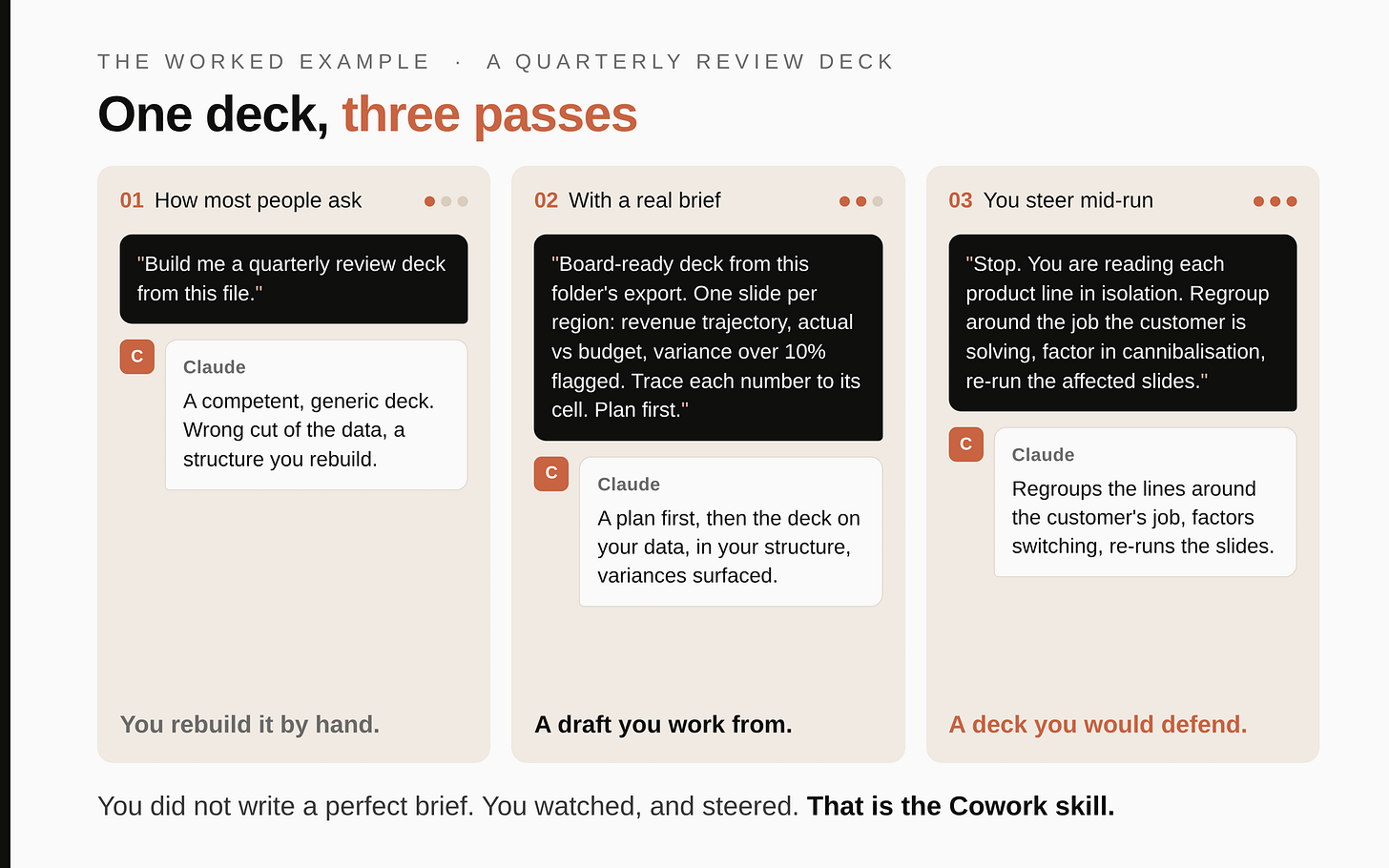
Enough principle. Here is the difference on the screen. Same tool, same job, three versions. This is a quarterly review deck built from a data export, the kind of job Cowork is most obviously built for, with illustrative structure and no real figures.
Version 1, how most people will ask:
Build me a quarterly review deck from this file.
Claude reads the export, guesses what matters, and produces a competent, generic deck. It picks columns it thinks are important, invents a slide structure, maybe sums two segments that should never be combined, and titles everything in its own voice. It looks finished. You open it and realise it is not yours: wrong cut of the data, wrong emphasis, a structure you will rebuild by hand. This is the Cowork equivalent of the empty brief from Part 1. The job was empty, so the deck was empty.
Version 2, with a real brief:
Build a board-ready quarterly review deck from the data export in this folder. Use only that file for numbers.
One slide per region, major regions only. On each slide: the revenue trajectory over the four quarters; actual against budget with any variance over 10 percent flagged in red; and a short "what to question" box with the two or three lines that do not hold up against the trend.
Trace every number to its source cell. If a figure is missing or does not reconcile, stop and flag it rather than filling the gap. Branded, confidential, no em dashes. Show me your plan and which sheets you will use before you build.
Now it has something to work with. It comes back first with a plan: which sheets it will read, how it will map columns to the trajectory, how it will compute the variance flag. You approve, and it builds the deck on your real data, in your structure, in your house style, with the variances already surfaced and a question box on each slide. That is a draft you can actually work from, not one you rebuild.
Version 3, the move almost nobody makes. You steer it mid-run:
Stop. You are reading each product line's numbers in isolation, but customers do not buy them in isolation, they hire whichever option does the job, including substitutes from neighbouring categories. Redo this around the job the customer is solving: group the lines that compete for the same need, and factor in cannibalisation between our own products and switching to and from adjacent categories. Re-run the affected slides.
And here is the payoff of the whole guide. Because the work was visible, you caught the real flaw, an analysis framed too narrowly, one product line at a time, while it was still on screen, not after the pack had gone to the board. Claude does not get defensive. It regroups the lines around the job the customer is hiring the product to do, factors in cannibalisation and cross-category substitution, re-runs the affected slides, and the deck sharpens into something you would defend in the room. You did not write a perfect brief. You wrote a good one, watched the plan, and corrected in flight. That is the entire Cowork skill.
Notice what just happened against the mechanism. You pointed it at one folder (access). You watched it plan and steered it (visible steps). You got a real .pptx, not text to copy out (real file). And you caught a flawed analytical frame before it reached the board (acting carries weight). All four, in one job.
The mistakes, and the mechanism behind each
These are not a random list. Every one is the mechanism biting someone who forgot it.
- Vague job, generic build. Access is the input now. "Build me a deck" gets you a deck-shaped guess. Brief the outcome, the source, the shape, and the rules.
- Pointing it at too much, or the wrong folder. It acts on what you give it. Give it your whole drive and it has more to misread and more that is sensitive; give it the wrong folder and it works from the wrong files. One job, one deliberate folder.
- Walking away on "act without asking" too soon. The visible steps are the safeguard. Let it run unwatched on unfamiliar files and you lose the chance to steer before it builds the wrong thing on top of itself. Supervise until you trust the workstream.
- Trusting a built file because it looks finished. A polished deck with a wrong number is more dangerous than a wrong sentence in chat, because it looks authoritative and travels. Verify the figures against source before it leaves your hands.
- Putting confidential material into a shareable workspace. Cowork works on real files in a real folder. Sensitive material does not belong in a project you might one day hand to a colleague. Anonymise, and follow your organisation's rules on what can enter the tool.
- Running everything through Cowork. It costs more usage and more setup than chat. If you are asking a single question with no files, you are in the wrong room. Drop back to chat.
- Re-briefing the same workstream every cycle. If you run the same review every quarter, it belongs in a project with folder instructions and reference files, not a fresh brief each time. Set it once.
- Closing the app mid-task. Cowork runs on your machine. If you close the desktop app or your computer sleeps, the task stops. Leave it open while a long job runs.
- The endless session. Like a long chat in Part 1, a long Cowork run re-reads its whole history at each step, so it slows and burns more of your usage. When a session has done its job or has wandered, start a fresh one rather than piling follow-ups on top. And let the simple steps run on a lighter, faster model; save the most capable model for the genuinely hard analysis.
Making it more powerful: connectors, schedules, and the browser
Once the basics are a habit, three additions extend what Cowork can reach.
Connectors link Claude to systems beyond your folder, so it can pull from a source directly rather than you exporting a file first. This is where Cowork eventually meets your document store, chat tool, or email. Be precise about the status: connectors depend on what your organisation has switched on, so verify what is available before you build a workflow that depends on one. Until then, Cowork works beautifully on files you put in the folder, which covers most of what you do. When a connector is available, set its access deliberately, because permission is granular: you can let Claude read from a tool while blocking it from sending or changing anything. The sensible default for something like a mailbox is to allow it to search and read, but never to send on your behalf.
Scheduled tasks let Claude run a job automatically or on demand, instead of you triggering it each time. Type /schedule inside a task, or use the Scheduled section in the sidebar, to set a cadence. The honest constraint: a scheduled task only runs while your computer is awake and the desktop app is open, so this is "run it each morning while I have my coffee," not "run it on a server overnight." For a job that should truly run unattended, that is Part 3, Code.
Claude in Chrome, if paired, lets Cowork act in your browser for tasks that need it. Treat anything that browses the open web with the prompt-injection caution from the honesty box: a page can carry instructions aimed at the agent, so supervise browser work.
You can also message Cowork from the Claude mobile app on some plans: you send the task from your phone, and Claude does the work on your desktop, which stays on at your desk. Useful for kicking off a long job on your way into a meeting.
Common questions
- Where is Cowork? I cannot find it at claude.ai. It is only in the Claude desktop app, not the browser and not mobile. Open the desktop app and look for the Cowork tab next to Chat.
- Does Cowork remember across sessions like chat memory? Inside a project, yes. A standalone Cowork session does not retain memory between runs. For anything recurring, work inside a project.
- Can it touch files I did not give it? No. It can only read and change the folder you select, plus any connector you explicitly grant. It cannot see the rest of your computer.
- Will it delete or overwrite my work? It asks permission before significant actions and always before permanently deleting a file. Its code runs in a sealed sandbox separate from your operating system. Still, review its plan before you let it act on files that matter.
- Why is it slower and using up my limit faster than chat? Multi-step work on real files is far more compute than a chat reply, so it consumes more of your usage allowance. Reserve it for jobs that need files and steps; keep simple questions in chat.
- Do I have to sit and watch? Your choice. "Ask before acting" pauses for your approval at each step; "act without asking" runs straight through. Use the first while you are learning a workstream, the second only when you are supervising trusted inputs.
- What is the difference between a skill and a connector? A skill is packaged know-how for producing something (a branded deck, a real Excel model). A connector is a link to an external system so Claude can reach data that is not in your folder. Different jobs.
- Can I share a Cowork session with a colleague? Not currently. Sessions are not shareable. You share the output file, or you package the workflow as a skill or plugin so others can run their own.
What may differ in your account (the honesty box)
I am describing Cowork as it generally works in mid-2026. Several things depend on your account and plan, so verify rather than take my word.
- Cowork is a research preview, and may not be switched on for you yet. It needs the desktop app on a paid plan, and on a managed work account an administrator may gate it. If you do not see the Cowork tab, that is usually why. Ask whoever administers your account. (There is also a small readiness check Anthropic provides to confirm your machine supports it.)
- Do not assume any connector is live. Treat connectors to your document store, chat, or email as "verify first," not "available." Build on files in your folder until you have confirmed otherwise.
- The app must stay open. Cowork runs on your computer. Close the app or let the machine sleep and the task stops. Scheduled tasks run only while the app is open and the computer is awake.
- Exact labels and menus shift between updates. The functions here are stable; the wording moves. If a label does not match your screen, look for the nearest equivalent.
- Agentic risk is real and new to most people. Because Claude takes actions, two cautions matter more than in chat: give very clear guidance around anything destructive, and be aware of prompt injection, where a web page or file tries to plant instructions for the agent. Anthropic has built defences, but supervise, especially while you are learning.
- Privacy and training follow your plan and any enterprise agreement. Confirm specifics rather than assuming.
The official Help Center at support.claude.com is the source of truth for current behaviour. For access and anything switched off, ask whoever administers your account.
Your first 30 minutes (do this once)
- Open the desktop app, find the Cowork tab, and confirm you have access. If you do not, that is the honesty box; ask your admin.
- In Settings, Cowork, paste the global instructions block and adapt the specifics.
- Select one real working folder, the one behind a deliverable you rebuild regularly, and set folder instructions for it.
- Run one real job the way I ran the deck: give it a vague ask first to feel how generic it gets, then a proper brief with the five parts, and steer it once while it works.
- Verify the numbers in whatever it built against the source file before you treat the output as real.
Not sure what to hand off first? Ask Claude to look over the repetitive, file-producing jobs in your week and suggest the two or three worth delegating. If you take one action from this guide, it is step 4. The skill is briefing, watching, and steering, not writing the perfect prompt.
Where Cowork sits: Chat and Code
Three rooms in the same house. You walk into a different one depending on the job.
| Room | What it is | A job it is built for |
|---|---|---|
| Chat | The normal claude.ai conversation | Pressure-test a decision, draft a narrative, summarise a meeting |
| Cowork | An agentic assistant in the Claude desktop app that reads your folders and builds finished files | Build the quarterly deck from the data export, a consolidation model with working numbers |
| Code | A terminal agent that builds and runs reusable workflows | Turn the deck build or the report into a workflow a whole team can run, unattended |
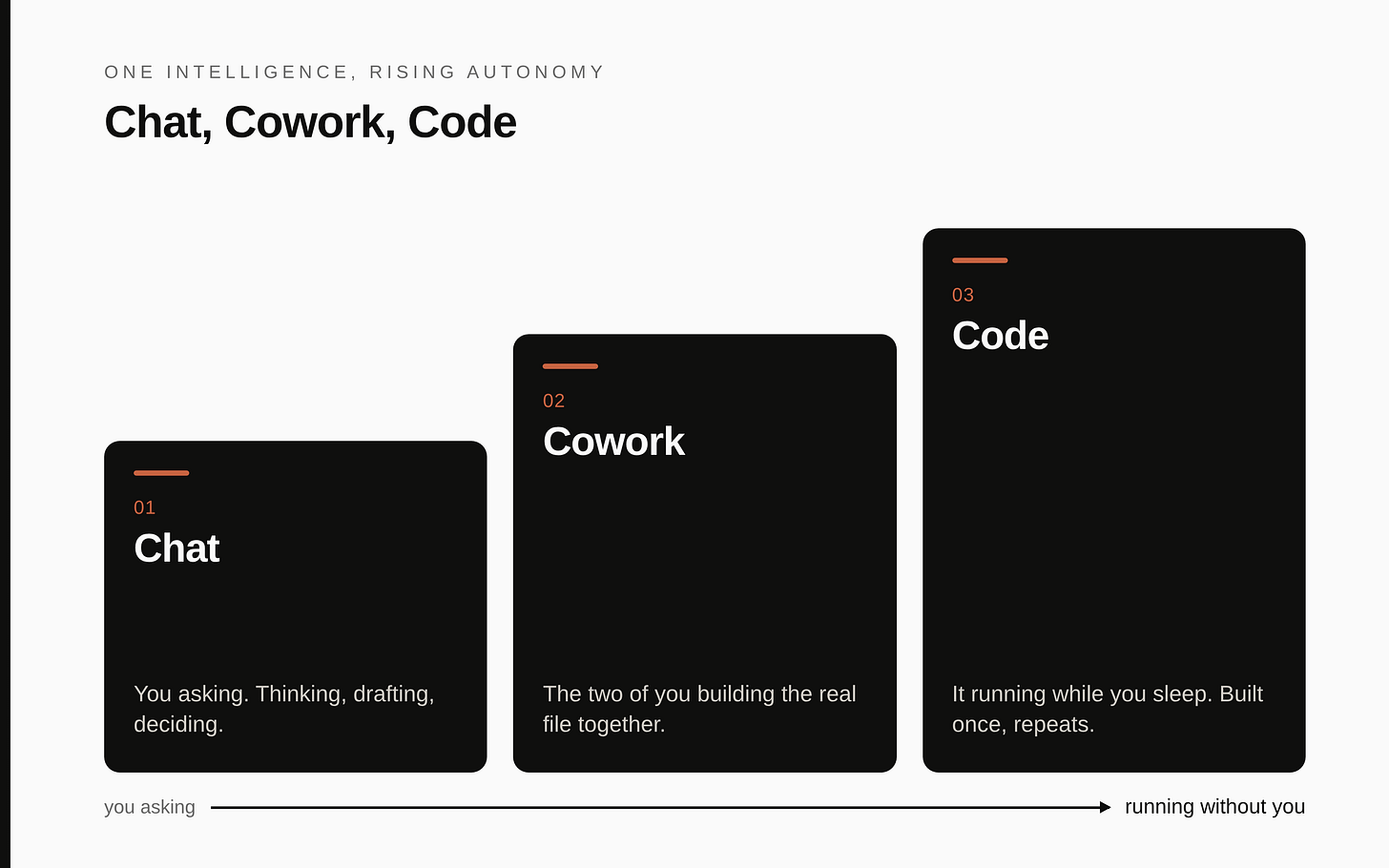
Part 1 was Chat: getting Claude to think with you. This is Part 2, Cowork: getting it to build alongside you. Part 3 is Code: building a workflow once and having it run without you, including the unattended and shared jobs Cowork cannot. Get Cowork into your hands on one real deliverable first, and Code stands on solid ground.