You have a tab open right now with ChatGPT, Claude, or Gemini in it. We have all been doing this since 2022. So I am not going to explain what a chatbot is.
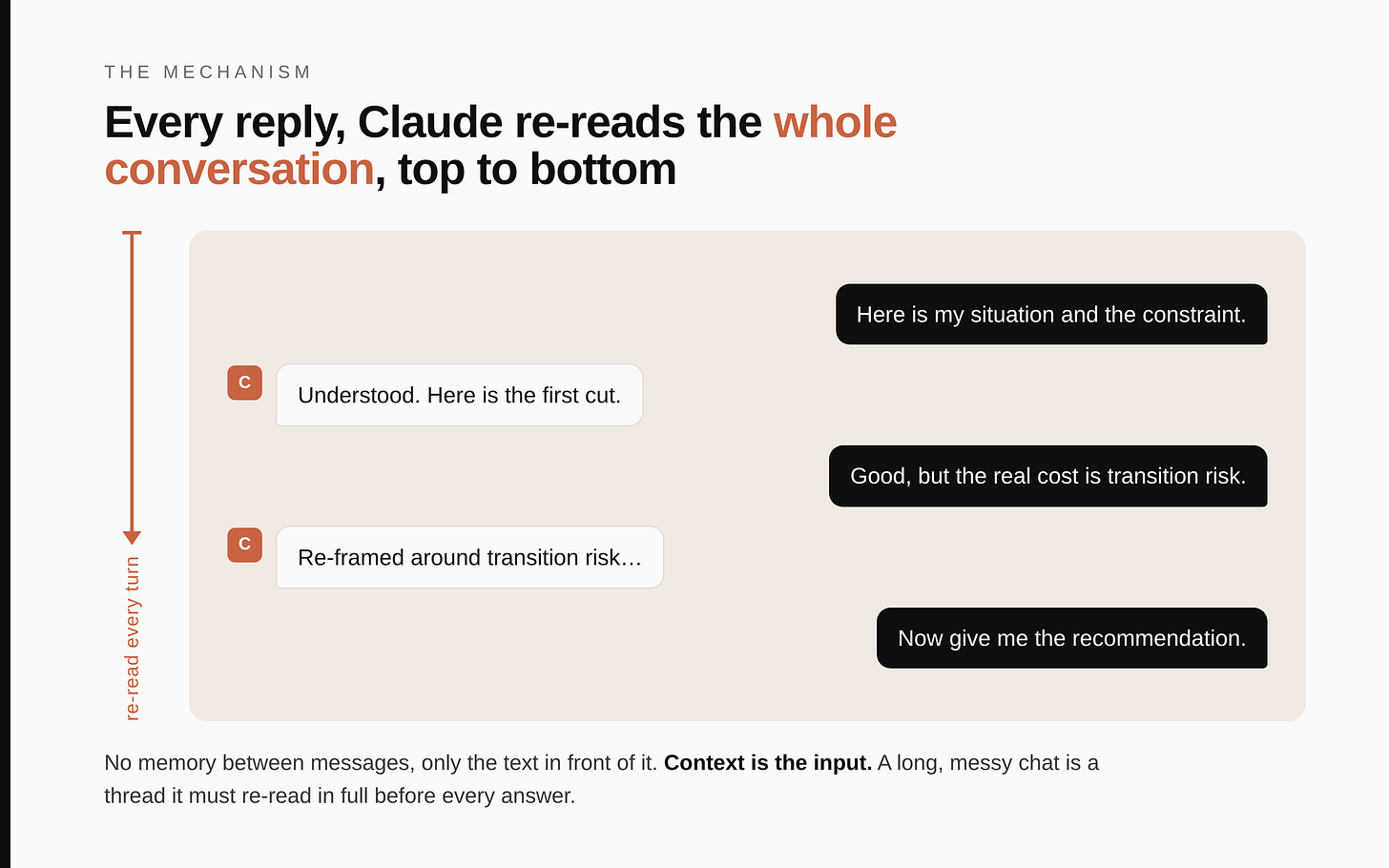
Here is the thing almost nobody who uses these tools casually actually knows, and it changes everything else: every time Claude replies, it re-reads your entire conversation from the top. Not the last message. The whole thing, top to bottom, every turn. Between messages it has no memory other than the text sitting in front of it.
That one fact is the spine of this whole guide. Once you understand it, every habit below stops being a tip you have to memorise and becomes obvious. Let me show you why, give you the two settings that fix it, then run one real commercial decision through it so you can see the gap between how most people use this and how it actually pays.
I will use claude.ai throughout. The ideas transfer to the others. The menu names differ.
The mechanism that explains everything
Picture the model as a brilliant analyst with total recall of everything written in the current document, and amnesia about everything outside it. Each time you hit enter, it reads the entire conversation so far as if for the first time, then writes the next line.
Four things follow directly, and they are the whole game:
1. Context is not optional, it is the input. The analyst only knows what is on the page. If you did not tell it your role, your constraint, your reader, it is guessing. A vague answer is almost always a vague brief. The quality of what comes out is set by what you put in, and most people put in almost nothing.
2. Long messy chats get measurably worse. Because it re-reads everything each turn, a chat where you have covered six unrelated topics is now an analyst forced to re-read six unrelated topics before answering the seventh. The signal you care about is buried in noise of your own making. It gets slower, it drifts, it starts contradicting itself. This is the tool faithfully reading the mess you built.
3. There is a ceiling on how much it can hold. The conversation lives in a working memory that is large but finite. Think of it very roughly as a few hundred pages of text. A long book. Go past that and the earliest parts fall out of view, which is why a marathon chat suddenly "forgets" what you said at the start. You did not imagine it. It genuinely can no longer see it.
4. Every turn pays for the whole conversation. Re-reading from the top is not free. Each reply has to process every word written so far, so the longer a chat runs, the more it costs to produce the next line, and you pay that price again on every single turn. On the API or a metered plan that is literal money. On a personal subscription it shows up as the usage limit you hit faster and replies that visibly slow down. The lever is the same either way: a lean chat stays cheap and quick, a sprawling one gets expensive and sluggish, and the eternal mega-thread is the worst offender because it re-charges its entire history every time you type.
Keep those four in your head. Everything below is just acting on them.
Two things that make Claude feel like it knows you
This is the part most people never learn, and it is why their Claude stays generic. There are two separate machines, and they do different jobs:
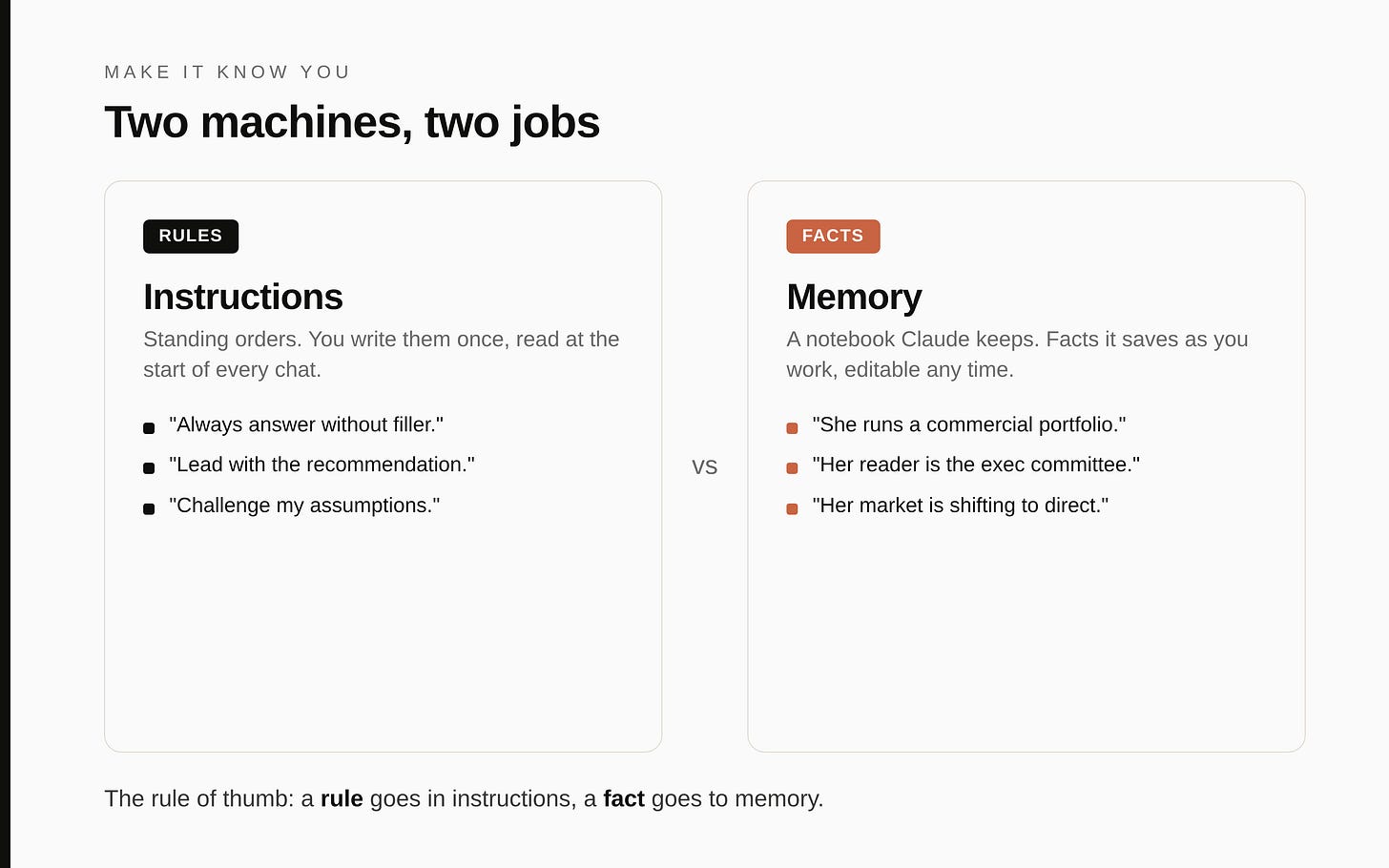
- Instructions are standing orders. You write them once. Claude reads them at the start of every conversation. Use them for things that are always true: who you are, how you want it to write, your defaults. You control these completely.
- Memory is a notebook Claude keeps. As you work, it can save facts ("she runs a commercial portfolio," "her main reader is her executive committee") so it does not start from zero next time. You can read, edit, and delete this notebook.
The rule of thumb that sorts almost everything: if it is a rule ("always answer without filler"), it belongs in instructions. If it is a fact ("my biggest market is shifting to direct distribution"), let it go to memory, or tell Claude to remember it.
One caveat, and it applies to one group of readers only. If you pay for Claude yourself, on your own personal account, skip this paragraph entirely, none of it touches you and you control everything. If instead your employer gave you Claude through a company account, there is a third layer above the two above: rules your IT team sets for the whole organisation. Those sit above your personal instructions and win any conflict. So if you are on a work account and something you ask for gets quietly overruled, that is usually why, and it is by design. Whenever this guide later mentions an administrator switching something on or off, that too is the work-account world. On a personal account, there is no administrator but you.
The rest of this guide shows you exactly where instructions and memory live, with prompts you can copy.
When to reach for chat, and when to move up
Chat is the right tool when the work is thinking. Deciding something, drafting something, pressure-testing a view, turning a mess in your head into words. Most days that is 90 percent of what you need, and living there is fine.
You have outgrown chat the moment you catch yourself doing one of two things.
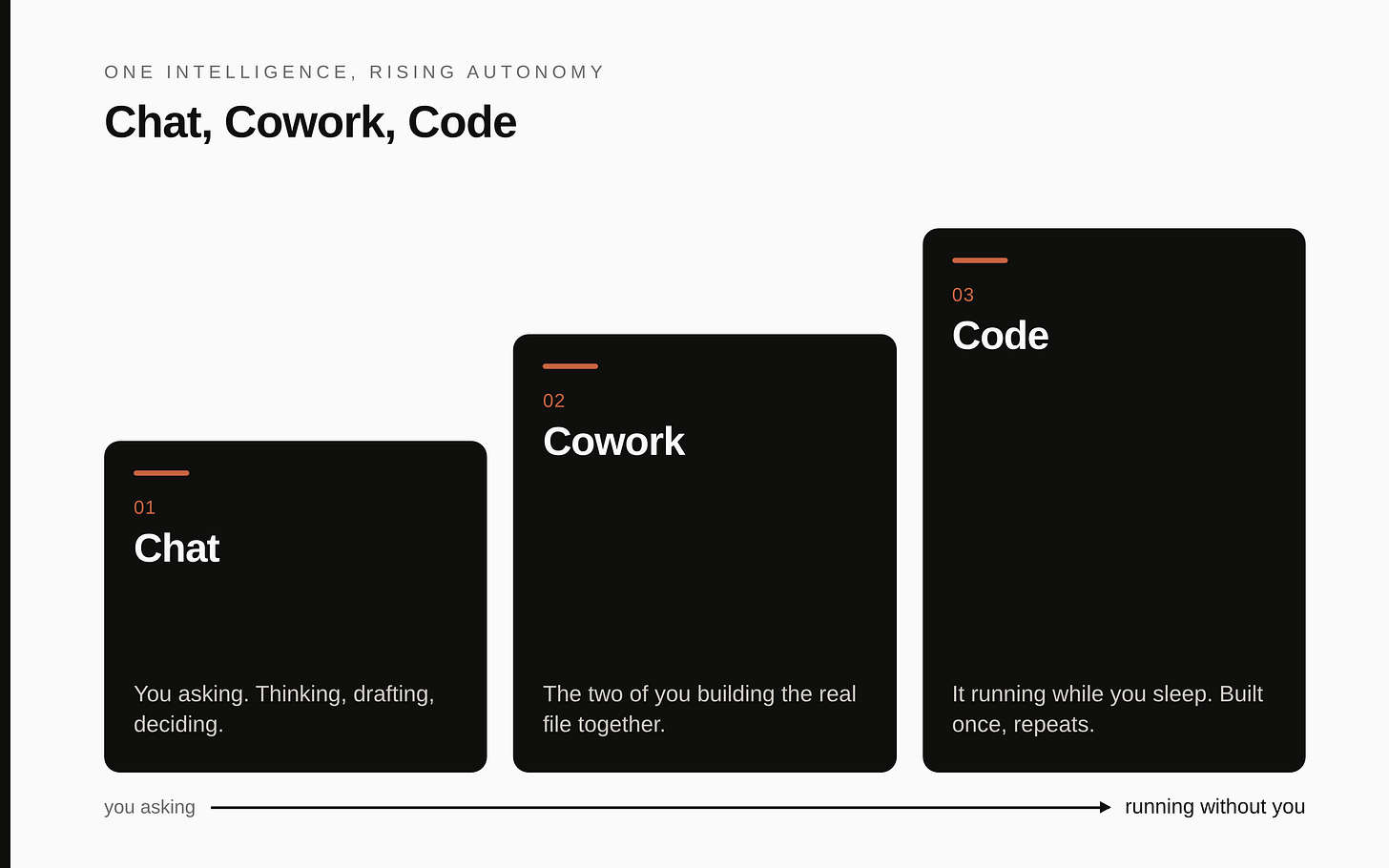
The first is iterating on the same real artifact over and over. A board deck, a model, a long document you keep pasting back in. When the work is a thing you are building together rather than a question you are asking, that is Cowork. Claude works on the actual file alongside you and holds the thread across sessions. Part 2.
The second is wanting the work to happen without you sitting there. The same report every Monday. A data pull you do by hand each month. When the answer is "do this for me automatically" rather than "help me right now," that is Code. You build it once and it runs. Part 3.
Short version. Chat is you asking. Cowork is the two of you building. Code is it running while you sleep. They are one intelligence at rising levels of autonomy, and the habits you build here carry straight up. Get chat right and the next two stand on solid ground.
Set up your context once. Here is the exact block.
The single most common waste in chat is reintroducing yourself. People type three lines of background into a fresh chat, get an answer, then type the same three lines an hour later. Every day. Forever. Remember the mechanism: the model starts each conversation blank, so without a standing instruction it genuinely does not know who you are.
There is a settings field that ends this. In claude.ai, click your name or initials at the bottom left, open Settings, find the Profile section. There is a box, usually phrased something like "what personal preferences should Claude consider in responses." Whatever you put there loads into every new chat automatically.
This is where you install how you want to be thought with. Here is the actual block I would give a commercial leader. Copy it, change the specifics, paste it in:
Role: I run a commercial portfolio in an industrial B2B sector (P&L, multiple
product lines, distributor markets). I am senior, time-poor, and not technical.

How to answer me:
- Be direct and critical. Challenge my assumptions, do not agree by default.
- Lead with the answer, then the reasoning. No long preamble.
- Use specifics and numbers. Concrete beats comprehensive.
- When something is uncertain or you are guessing, say so plainly. Never invent
  figures, sources, or quotes.
- Default to a board-ready register: short sentences, no corporate filler, no
  motivational language.
- If my question is underspecified, ask the one question that would most change
  your answer before answering.
Four lines in that block do the heavy lifting, and each earns its place:
- "Challenge my assumptions, do not agree by default." Out of the box these tools are sycophantic. They mirror you. This line turns the analyst from a flatterer into a sparring partner, which is the only version worth a senior person's time.
- "When uncertain, say so. Never invent figures or sources." This is the most important line for anyone acting on the output. It does more to keep it honest than anything else you can write.
- "Ask the one question that would most change your answer." This stops it charging ahead on a bad brief and quietly forces better inputs out of you.
- Keep it tight. It loads into every conversation, so a wall of text dilutes everything else. Six lines that say how to think beat thirty that list what you do.
Two minutes. It changes every chat you have from then on.
While you are in there, look near the message box for a style selector (usually Normal, Concise, Explanatory, Formal). Set it to Concise so it stops padding, or Explanatory when you are learning something new. Most people never notice it exists, then complain Claude is too wordy.
Memory: let it stop starting from zero
Instructions are the rules you write. Memory is the facts Claude keeps as you work, so it does not re-learn your situation every week.
Where to manage it. Settings, then look for Capabilities, and a toggle usually phrased "generate memory from chat history." From there you can:
- View and edit the memory summary directly. Read what it has saved about you, fix anything wrong, delete anything you would rather it forgot.
- Pause it, which keeps what it has and stops adding more.
- Reset it, which permanently deletes everything it remembers. That one cannot be undone.
There is also usually an incognito or temporary chat for sensitive one-offs you do not want saved to memory or history at all. Worth knowing it exists.
How to create a memory. No magic phrase. Plain language works. Type something like this into a normal chat:
Please remember this for future chats: I run a commercial portfolio in an
industrial B2B business. My primary reader is my executive committee. I value
direct, critical answers over agreeable ones. Use this context going forward.
To confirm it stuck, open the memory summary in Settings and check it is there.
A fair warning before you lean on it. Memory is genuinely useful, and it is also the feature most likely to be switched off until an administrator enables it, especially on a work account. If you cannot find it, that is usually why. More on that in the honesty box near the end.
Projects: the habit that changes everything
This is the biggest single jump in the whole guide, and it falls straight out of the mechanism. If the model starts blank every time and you have a body of context you keep pasting, you are doing manual labour a container would do once.
Think about how expertise actually works around you. For your taxes you go to an accountant. For a contract question, your lawyer. Each one already holds your context and a clear job, so you do not start from scratch every time. Most people use Claude as one generalist who gets a different vague brief every conversation, so its sense of your situation stays permanently blurry. A Project fixes that. It is a persistent space that holds three things about one area of your work:
- Project instructions: standing rules for this area, a role for Claude, a method, a format.
- Project knowledge: documents you upload once and Claude can see in every chat here, a strategy summary, last quarter's numbers, a glossary, a style guide.
- Project memory: a running record of your conversations in this project, kept separate from your other projects.
Open your "portfolio reviews" project and Claude already knows the portfolio, the files, and how you think. You stop briefing a stranger every time.
A concrete example so this is not abstract. I keep a Project for portfolio reviews. In its knowledge, by name:
portfolio-one-pager: the products, markets, and current strategy in two pagesglossary: internal terms and what they mean, so I never re-explain themlast-quarter-numbers: the headline figures, anonymisedhouse-style: how I want documents written for my board
Its instructions are one line: "Audience is my executive committee. Assume they know the portfolio. Get to the recommendation." Now every chat in that Project knows my portfolio, my terms, my numbers, and my style before I type a word.
How to build those four documents (let Claude write them)
You do not sit down and write these from a blank page. You have Claude build them, which is the whole point. Each one takes 10 to 15 minutes.
The portfolio one-pager. Open a chat and talk, do not type an essay. Say: "Interview me to build a two-page summary of my commercial portfolio: the product lines, the markets, the channel, and the current strategy and priorities. Ask me 5 questions at a time, push back where my answers are vague, and when you have enough, write it as a clean two-page brief I can paste into a Project." Answer the questions, correct the draft once or twice, save the result. If you already have a strategy deck, attach it and say "turn this into a two-page summary instead," then fix what it got wrong.
The glossary. This one writes itself from your own documents. Attach two or three things you have already written (a board paper, a strategy note, an email to your team) and say: "Pull out every internal term, acronym, brand name, and bit of jargon in these documents and give me a glossary with a one-line plain definition for each. Flag anything you are unsure about so I can correct it." You will be surprised how much shorthand you use without noticing. Edit the definitions, save it.
The last-quarter numbers. Keep this short and anonymised. The point is to give Claude scale and shape, not a data room. A single page is enough: headline revenue, growth, margin direction, the two or three numbers that actually drive your decisions, expressed as ranges or rounded if the precise figures are sensitive. You can write this in five minutes, or paste a messy set of figures and say "organise these into a one-page headline summary, round everything, and label what each number is."
The house style. The fastest of the four. Attach two or three documents you think are well written, ideally things you wrote or admire, and say: "Study how these are written. Write me a one-page style guide that captures the tone, structure, and rules, so you can match it in future. Cover sentence length, formality, how to open and close, what to avoid." Read it, add any hard rules it missed (mine would include "no em dashes, no filler, lead with the recommendation"), save it.
A quick word of care on what goes into any of these. Knowledge files sit in your account and feed every chat in the Project, so treat them the way you would treat a document you email outside the building. Anonymise figures that are genuinely sensitive, leave out anything confidential or personal about named people, and if you are on a work account, follow whatever rules your employer has set about what can go into an AI tool. None of these four documents needs a real secret to be useful.
The prompt that builds your projects for you
Here is the most useful thing in this whole guide. You do not have to design your projects alone. Open a fresh chat, paste the prompt below, and Claude becomes a workspace architect that interviews you, drafts the instructions for each project, and tells you exactly what to upload. It works one project at a time and will tell you when to stop and continue in a new chat.
You are going to design my Claude workspace with me. We will build a set of Projects,
each with its own instructions and uploaded documents, and we will do it properly: one
project at a time, no skipping ahead, no filling in my answers for me. Ask, wait, then
build.

STAGE 1 - MAP THE WORKSPACE
These are the areas of my work I want Claude to help with:
[LIST YOUR AREAS, one line of purpose each. A commercial leader usually has a mix of
repeating processes (board reporting, the planning cycle, competitor tracking) and
ongoing workstreams (a lead product line, a key market, my own writing).]
Do this:
- Tell me, for each area, whether it stands on its own as a project or should be merged
  or split, and why.
- Name the areas I have probably missed, based on what I have told you.
- Propose a naming scheme so the projects sit together sensibly in my sidebar.
- Lay the result out as a table: Project | What it is for.
- Get my sign-off, then have me create the empty projects and pick the two or three to
  build first.

STAGE 2 - BUILD ONE PROJECT (repeat per project)
Open by asking how long I have, suggest 30 minutes, and hold me to it.
- Take stock: ask what I already have for this area (strategy notes, plans, numbers,
  competitor files) and tell me what to dig out.
- Interview me until you could write genuinely specific instructions. Cover the expert
  role you should play here, where this area stands today, what I am trying to achieve
  near and long term, how I work and what limits me, my hard rules, and the facts that
  matter (competitors, what I can and cannot claim, the deliverables that recur). Put 3
  to 5 questions to me at a time, grouped sensibly. When an answer is woolly, say so and
  make me give you a concrete example. Run two to four rounds. Do not move on while you
  would still be guessing.
- Play back what you have understood and what is still thin, then ask your last questions.
- Write the instructions under these headings: Role; Context; What Matters Most; How To
  Work With Me; What Never To Do. Use my real names, numbers, and dates. Stay under 1500
  words. The "what never to do" part is not optional: never invent facts or sources,
  always work from the uploaded files and say when something is missing, and flag any
  uncertainty out loud. Show me the draft, take my edits, redraft until I am happy.
- Tell me precisely which documents to upload here, and which ones I need to create
  because they do not exist yet.
- Close the project off: hand me a short record of my answers to keep, plus a simple way
  to maintain it. Then move to the next.

HOW I WANT YOU TO RUN THIS
- One project at a time. Never run ahead. Be direct and quick.
- Argue with weak logic. If a project is redundant or a goal does not hold up, say so.
- This is a working session, not a questionnaire. The instructions are only as good as
  the context I give you, so push for it.
- If we run long, stop, write me a handover, and tell me to carry on in a fresh chat.
  Never set up more than two projects in one sitting.
- The bar: instructions good enough that opening any project feels like sitting down with
  someone who already knows my work.

Start with Stage 1.
Budget 20 to 40 minutes per project to do it well. You do not need them all today. Get your top 2 or 3 live this week and build the rest later.
The quicker version, if you just want one project running in five minutes. Create it, paste this into its instructions, upload your files:
Act as my thinking partner for the [area] workstream. Treat the files in this project as
my source of truth: base your answers on them, and when something is not there, say so
and ask rather than guess. Be direct, reason from first principles, push back on weak
logic, and say plainly when you are unsure. Never make up figures, sources, or claims.
If you take one action from this guide, it is this. For anything recurring, stop working in loose one-off chats and make a Project.
The file decision: paste, attach, or knowledge?
You get information into Claude three ways, and the mechanism decides which is right. Two of them put the full text into the conversation that gets re-read every turn. One does not. That is the whole distinction.
Paste it into the chat. For short text: a paragraph, an email, a list. It becomes part of the conversation, gets re-read each turn, and is gone when you move on. Right for one-off throwaway context.
Attach it to the message (paperclip or plus near the box). For a real file you want read right now: a PDF, a spreadsheet, a deck, an image. Important consequence of the mechanism: an attachment is read in full, every turn, for the rest of that chat. Attach a 100-page report and you have just filled the working memory with 100 pages that get re-read on every reply. The answer gets worse, and slower. So attach the 3 pages you need, not the whole binder.
Put it in Project knowledge. For anything you will use more than once. It lives in the Project, available to every chat, and the model pulls from it rather than carrying the whole thing in active conversation. Set once, used forever.
| Situation | What to do | Why |
|---|---|---|
| Short text, used once | Paste into the chat | Cheap, disposable |
| A real file, analysed once | Attach to the message | Read in full this chat only. Trim it first |
| The 100-page report, but you need 3 pages | Copy out the 3 pages, paste those | Do not make it re-read 97 pages it does not need |
| Anything you will reuse | Project knowledge | Set once, every chat sees it |
And the mistake that costs people their work: Claude's answers live inside the chat where it wrote them. They are not filed anywhere you will find in three weeks. If it produces something you will need again, copy it into your own document or notes the moment it is good. Do not assume you will scroll back and find the right chat. You will not. Output you cannot retrieve when you need it might as well not exist.
One real decision, run start to finish
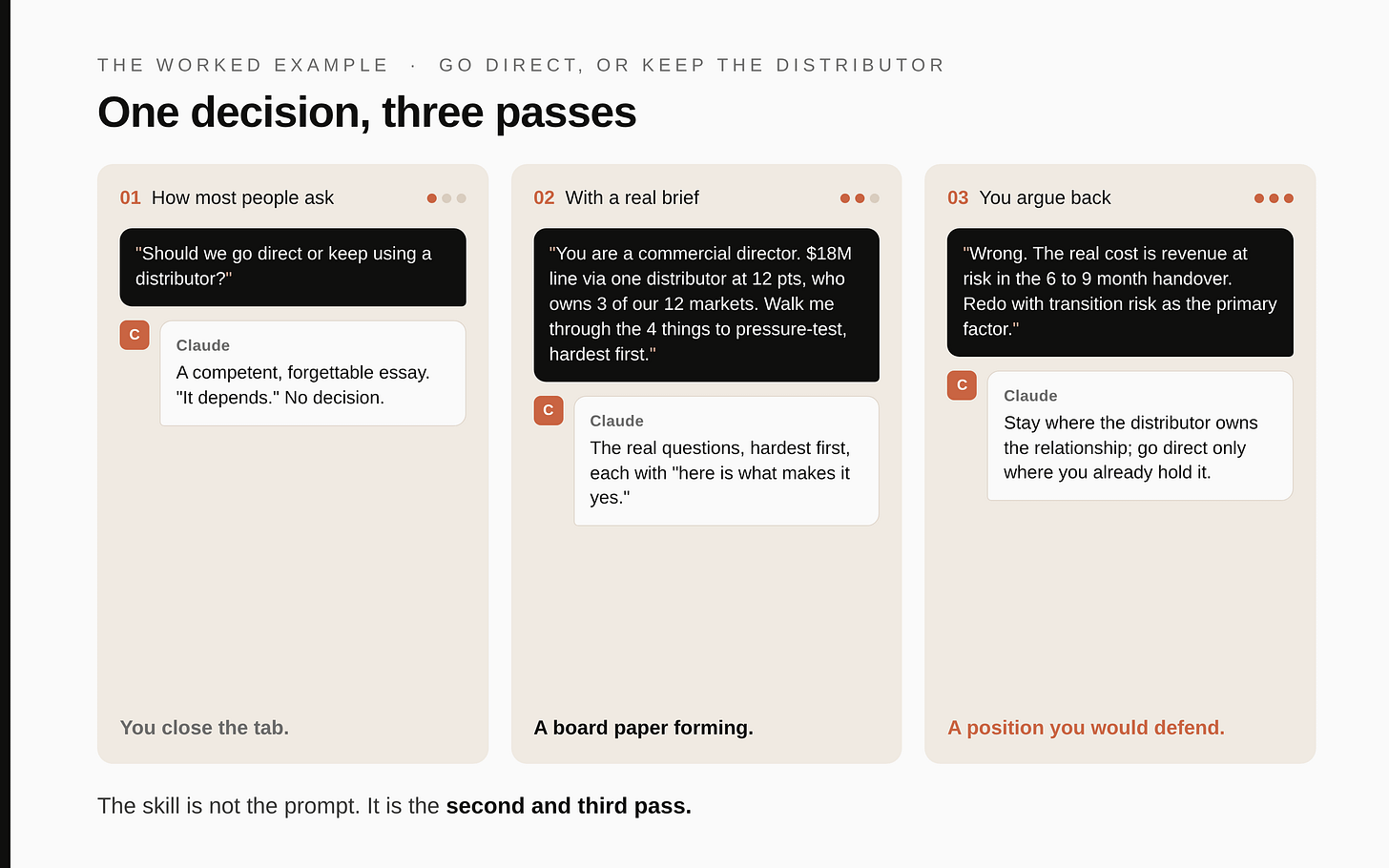
Enough principle. Here is the difference on the screen. Same tool, same question, three versions. This is an anonymised mid-cap example, the kind of call I have made many times: a $200M chemicals distributor weighing whether to keep selling a product line through a third-party distributor or go direct.
Version 1, how most people ask:
Should we go direct or keep using a distributor for one of our product lines?
What comes back is a competent, forgettable essay. "It depends on your margins, your customer relationships, your logistics capability," a balanced list of pros and cons, no decision. You read it, think "I knew all that," and close the tab. This is the search-box ceiling, and it is why most senior people try Claude once and walk away. The brief was empty, so the answer was empty. The mechanism warned us: it only knows what is on the page.
Version 2, with a real brief:
You are a commercial director pressure-testing my thinking.
Situation: one product line, roughly $18M revenue, sold through a single distributor who takes 12 points of margin. They own the customer relationships in 3 of our 12 markets. We have no direct sales force in those 3 markets today. Switching to direct would mean hiring or reassigning around 4 people and would take an estimated 6 to 9 months.
Walk me through the 4 things I should pressure-test before deciding, hardest first. For each, tell me what evidence would make me say go direct versus stay.
Now it has something to work with. It comes back with the real questions: who actually owns the customer, the distributor or you (test it by asking how many of those customers would follow you). Whether 12 points of margin is buying distribution or buying access you cannot replicate in 9 months. What the distributor does when they sense you leaving, and whether they can hurt the other 9 markets. The true cost and ramp time of those 4 hires against the margin you would recover. Each one with "here is what would make the answer yes." That is a board paper forming, not an essay.
Version 3, the move almost nobody makes. You argue with it:
Good. But you treated the 12-point margin as the cost of going direct. That is wrong. The real cost is the revenue at risk in the 6 to 9 month transition if customers churn during the handover. Redo the recommendation with transition risk as the primary factor, not steady-state margin.
And here is the payoff of the whole guide. It does not get defensive. It takes the correction, re-frames around transition risk, and the recommendation sharpens into something you would actually defend in the room: stay with the distributor in the 3 markets they own, because the churn risk during handover outweighs the recovered margin, and go direct only in markets where you already hold the relationship. A real position, reached in three exchanges, that you can take to your team on Monday.
That is the entire skill. Not the prompt. The second and third passes. The first answer is a draft you correct, the way you would send back an analyst's first cut. Everyone who finds Claude underwhelming stopped at Version 1.
The mistakes, and the mechanism behind each
These are not a random listicle. Every one is the mechanism biting someone who forgot it.
- Empty brief, vague answer. It only knows what is on the page. Version 1 above. If the answer is generic, your prompt was generic.
- Stopping at the first answer. The value is in the argument, not the opener. If you take Version 1 and leave, you used a tenth of it.
- Several jobs in one prompt. Three questions in one message get three half-answers, because it is trying to hold three threads at once. Ask the most important, get it right, move on.
- Reintroducing yourself every chat. It starts blank by design. That is what the Profile block and memory are for. If you are still typing your role into each new chat, go back and set it once.
- Re-pasting the same documents. Same fix one level up. Recurring context belongs in a Project, not your clipboard.
- The eternal mega-thread. One chat you never close, loaded with unrelated topics. Remember it re-reads all of it every turn. It slows, drifts, and contradicts itself, and you cannot find anything in it. One chat, one job. New subject, new chat.
- Attaching the whole binder. The 100-page PDF when you need 3 pages. You just buried your question under 97 pages it re-reads every reply. Trim first.
- Trusting confident output you did not check. It can be fluent and wrong in the same breath. On anything you will act on or send, verify. A sharp analyst whose work you still sign off, not an oracle.
Common questions
- Does Claude remember my past chats? Only if memory is on, in Settings. Otherwise each chat starts fresh.
- How do I make it write in my style every time? Put your rules in the Profile instructions. For one project only, put them in that project's instructions.
- Profile instructions versus project instructions? Profile applies everywhere. Project applies only inside that project. If your company set organisation-level rules, those override both.
- Can I upload files? Yes, in a single chat (attach) or into a Project (knowledge that persists across every chat in it).
- How do I delete what Claude knows about me? Settings, the memory summary, then edit or reset.
- Why did Claude ignore my instruction? Usually a higher-priority instruction overruled it, or your instruction was buried in a long chat. Be specific and keep critical rules short.
- Are my chats used to train the model? On business and enterprise accounts, your data is typically not used for training, but confirm it against your own company's agreement rather than assuming.
- Free or paid? The free tier is enough to do everything in this guide. Paid raises your usage limits and unlocks the more capable models for genuinely hard analysis.
What may differ in your account (the honesty box)
I am describing claude.ai as it generally works. A few things depend on your account, so verify rather than take my word:
- Memory may be switched off until an administrator enables it, especially on a work account. Check Settings.
- Exact button labels shift between updates. The function is stable, the wording moves. If a label here does not match your screen, look for the nearest equivalent.
- Privacy and training: if this is a work account, confirm the specifics against your company's agreement.
The official Help Center is the source of truth for current behaviour. For access and anything switched off, ask whoever administers your account.
Your first 20 minutes (do this once)
- Open Settings, paste the Profile block, adapt the specifics, send one real task to feel the difference.
- In Settings, check whether memory is on. If yes, tell Claude one true fact about your role to remember.
- Create one Project for something recurring. Either run the workspace-architect prompt, or use the quick version and upload one real document.
- Take a decision you are actually weighing this week and run it the way I ran the distributor call: empty ask, then a real brief, then argue with the answer twice.
- Save anything good out of the chat into your own notes before you close it.
That is Chat, used the way it actually pays. One mechanism to understand, two settings that make it know you, a Project for anything recurring, the file decision that follows from how it reads, and a worked example showing where the value really sits, in the second and third pass.
Part 2 is Cowork: what happens when Claude stops answering questions in a box and starts working alongside you on the real deck, the real spreadsheet, and the tools those files already live in.