Most small businesses do not need to start their AI journey with a complex agent. They need to start with the first moment where money, trust, and operational friction meet: a new lead arrives.
- Someone fills in a form.
- Sends a WhatsApp message.
- Replies to a post.
- Asks a question by email.
- DMs on Instagram.
- Clicks a booking link but does not finish.
At that moment, the business has attention. Not theoretical attention. Commercial attention. The person is interested now. They have a need now. They are comparing options now.
And this is exactly where many businesses lose momentum.
- The reply comes too late.
- The answer is too generic.
- The same questions are asked manually.
- The lead is not qualified.
- The next step is unclear.
- The information stays inside a chat thread.
- Follow-up depends on memory.
This is why new lead response is one of the first AI workflows I would build for almost any small business. It is the most exciting use case, but definitely is one of the clearest. It touches revenue, customer experience, response speed, data quality, team workload, and follow-up discipline. And unlike many AI ideas, you can usually see the value very quickly.
A lead response is not just a reply
When people hear "lead response automation," they often imagine an autoresponder. Something like: Thanks for your message. We will get back to you soon.
That is not a lead response system. That is a receipt.
A real lead response workflow does more than acknowledge the message. It helps move the lead from interest to action. A good workflow should do five things:
- Acknowledge. Let the person know the message was received.
- Classify. Understand what kind of inquiry it is.
- Qualify. Collect the minimum useful information.
- Route. Decide the next best action.
- Record. Save the information somewhere useful.
This is the difference between a chatbot and an operating workflow: a chatbot answers, while a workflow moves work forward. That distinction matters, because the business outcome is not "AI replied." The outcome is:
- faster response
- fewer missed leads
- better qualification
- less owner interruption
- more consistent follow-up
- cleaner customer data
- more bookings, calls, or sales opportunities
That is where AI becomes practical.
Do not start with full autopilot
This may sound strange in an article about automation, but I would not start by letting AI fully respond to every lead. That is usually too much too early. The first version should create control before autonomy. For many businesses, the safest progression looks like this:
- Templates. Humans reply manually using reusable response patterns.
- AI draft assistant. AI classifies the inquiry and drafts a reply. A human approves.
- Semi-automated workflow. AI handles simple cases and escalates exceptions.
- Agentic workflow. AI can use tools: book appointments, update the CRM, trigger follow-up, and notify the team.
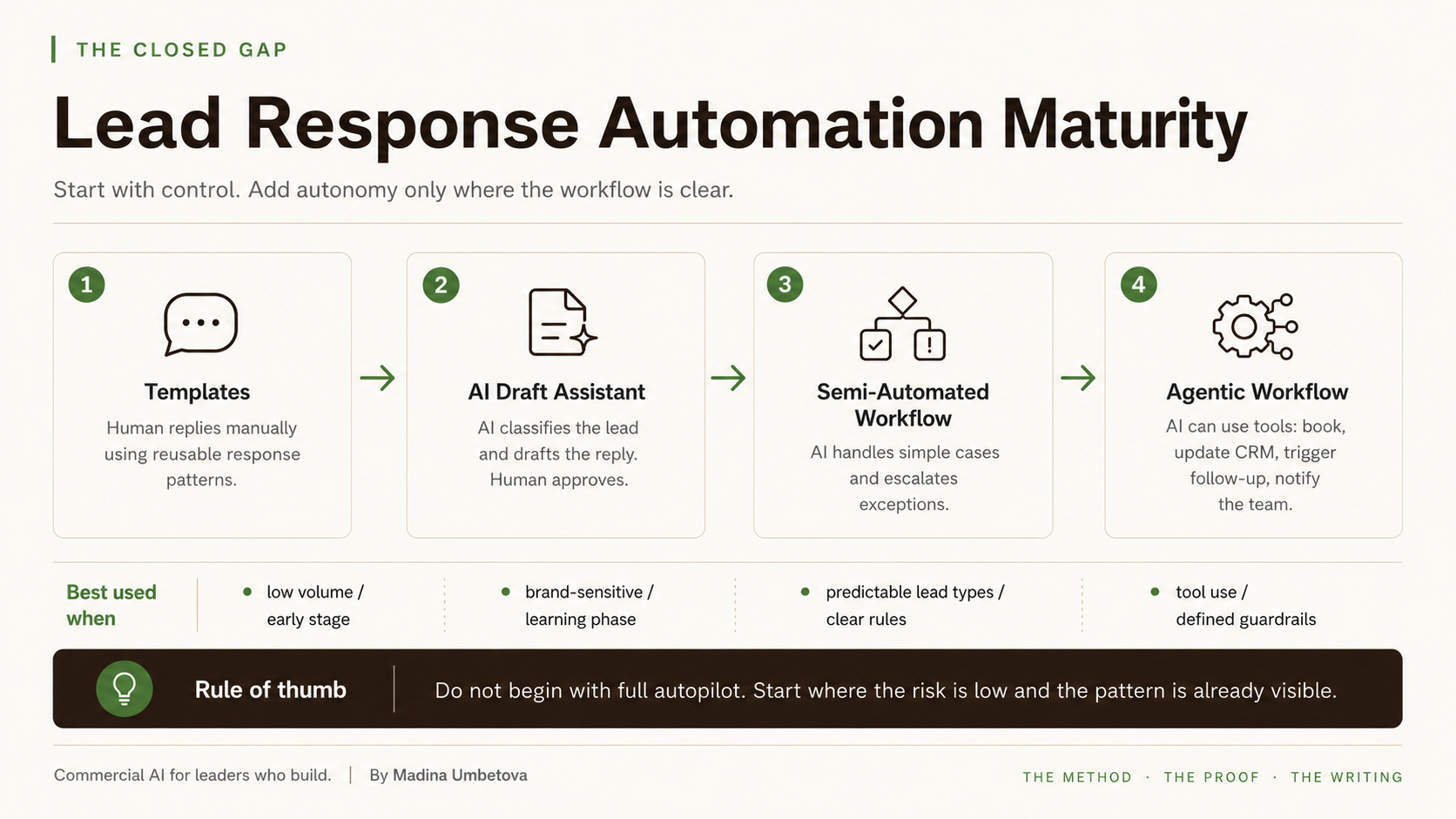
The mistake is jumping straight to level four because it sounds impressive. But autonomy only works when the workflow is clear. If the business has not defined what a good response looks like, what information is required, what counts as a qualified lead, and when a human should take over, then AI will not fix the process. It will simply automate the confusion.
The rule of thumb is simple: do not begin with full autopilot. Start where the risk is low and the pattern is already visible. That might mean AI drafts the reply, but a human sends it. Or AI handles simple booking questions, but sends unclear or high-value inquiries to a person. Or AI extracts the lead details and prepares a summary, but does not speak to the customer yet.
This is still valuable. In fact, for many businesses, this stage may be the most valuable, because it reduces cognitive load without creating unnecessary risk.
What the workflow should actually do
A new lead response workflow should turn an unstructured message into a structured next step. Here is the basic flow:
- New lead arrives.
- Source and raw message are captured.
- AI classifies the inquiry.
- AI extracts key details.
- The system checks whether enough information is available.
- If not, it asks one to three clarification questions.
- If yes, it routes the lead to the next step.
- The lead is saved in a CRM, Airtable, Google Sheet, or database.
- Follow-up is triggered if there is no reply.
This is not complicated. But it is powerful because it solves the real operational problem. Most leads do not arrive in a clean format. They arrive like this:
- Hi, do you have time this week?
- How much?
- I saw your post about AI workflows. Can you help us automate reporting?
- I need an appointment but not sure which service to choose.
A human can understand these messages. AI can often help understand them too. But the business needs to define what should happen next. For example: Is this a booking request? Is it a price question? Is it a service inquiry? Is it a complaint? Is it a high-value B2B lead? Is the request unclear? Is enough information available? Should the system reply, ask questions, send a booking link, create a task, or notify a human?
This is where AI becomes useful: not as a magic responder, but as a structured interpretation layer.
The minimum viable stack
You do not need an enterprise system to test this. The first version can be simple. The important thing is not the tool, but the structure. The workflow needs one place where the lead is captured, one logic layer that decides what happens next, and one system of record where the information does not disappear.
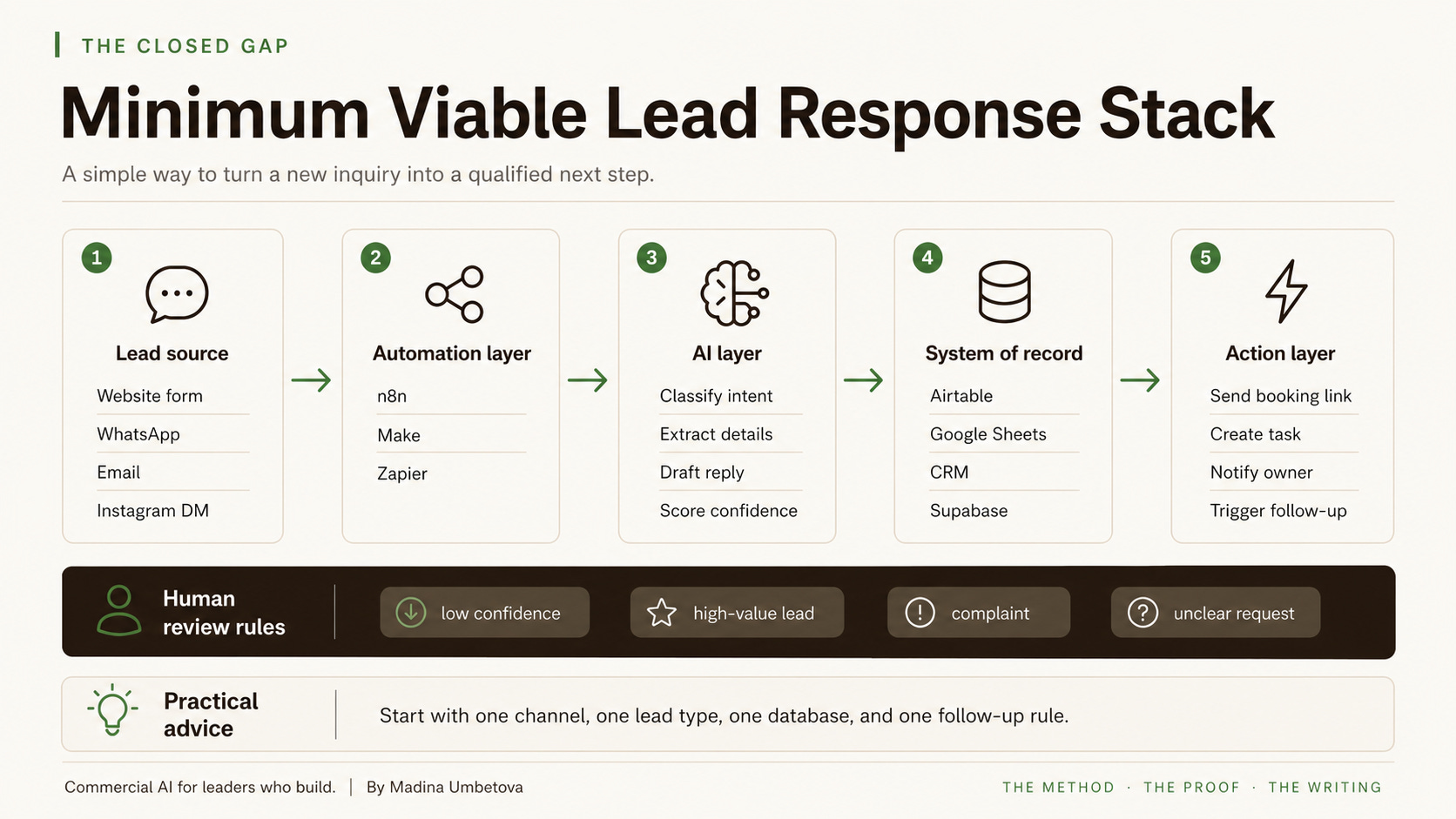
For the first version, I would not connect every channel. Start with one. One website form. One WhatsApp entry point. One email inbox. One lead type. The goal is to prove that the business can answer faster, capture better information, and follow up more consistently.
The AI layer: classification, extraction, and drafting
The AI layer has three useful jobs in this workflow.
1. Classify the lead
The first job is to understand the type of inquiry. For example:
booking_requestprice_questionservice_questionsupport_requestcomplaintpartnershipspamunclear
This classification matters because not every lead should receive the same response. A booking request should move quickly toward availability. A price question may need clarification. A complaint should usually go to a human. A high-value B2B inquiry may deserve a personal response. An unclear message may need one or two follow-up questions. This is one of the first places where AI creates value: it helps the business stop treating every message the same way.
2. Extract useful information
The second job is to turn messy language into structured fields. For a local service business, that might include:
name,service_requested,preferred_date,preferred_time,location,existing_customer,urgency,missing_information
For a B2B service business, it might include:
company_name,problem,current_tools,urgency,budget_signal,decision_stage,requested_next_step,missing_information
This is important because the business cannot improve what it does not capture. If every conversation stays buried in WhatsApp, Instagram, or email, the business has no reliable view of demand, lead quality, conversion, or follow-up.
3. Draft the response
The third job is to prepare a reply. But again, I would usually start with human review. A good first workflow is: new lead arrives, AI classifies the lead, AI extracts the key details, AI drafts a reply, a human approves or edits, the reply is sent, the lead is saved, and follow-up is scheduled.
This is not "full automation." But it already removes a lot of friction. The human no longer starts from a blank screen. The lead is no longer forgotten. The next step is no longer dependent on memory. That is already a meaningful improvement.
The decision layer is where the real system lives
The most important part of this workflow is the decision logic. The workflow needs rules. For example:
- If category = spam, mark as spam and do not reply.
- If category = complaint, acknowledge and notify a human.
- If confidence < 75, send to human review.
- If missing_information is not empty, ask 1 to 3 clarification questions.
- If booking_request and enough information is available, send a booking link or check the calendar.
- If price_question, provide guidance or ask a clarifying question.
- If high-value B2B lead, notify the owner and create a CRM task.
This is where many AI implementations become weak. They focus on the reply. But the reply is only one part of the workflow. The more important questions are: What should happen next? Who owns it? When should the system stop? When should a human take over? What should be recorded? What follow-up should happen? What counts as success?
AI can support the workflow, but leadership has to define the operating logic.
Human review is not a weakness
Some people treat human review as a sign that the automation is not mature. I see it differently. Human review is often what makes the system usable, especially at the beginning. The system should send leads to human review when:
- confidence is low
- the lead is high-value
- the request is unclear
- the person is angry or emotional
- the topic is sensitive
- pricing is complex
- the answer could create risk
- the lead has already asked twice
- the request is outside the knowledge base
This is not anti-automation. This is responsible automation. The goal is not to remove humans from the workflow. The goal is to remove avoidable delay, repetition, and missed context.
How I would build the first version
If I were building the first version, I would keep it very practical. Here is the sequence I would use:
- Trigger. A new lead is received.
- Save raw message. Store the source, contact details, original message, and timestamp.
- AI classify. Identify whether the inquiry is about booking, price, service, complaint, or something unclear.
- AI extract. Pull out useful details such as service, timing, urgency, and missing information.
- Decision logic. Check whether there is enough information and whether AI confidence is high enough.
- Draft or send reply. Start with human review. Auto-send only simple, low-risk cases later.
- Update CRM status. Mark the lead as new, needs info, qualified, booked, human review, follow-up, or closed.
- Notify owner or team. Send a short summary and the recommended next step.
- Wait and follow up. If there is no reply after 24 hours, 3 days, or 7 days, trigger a follow-up.
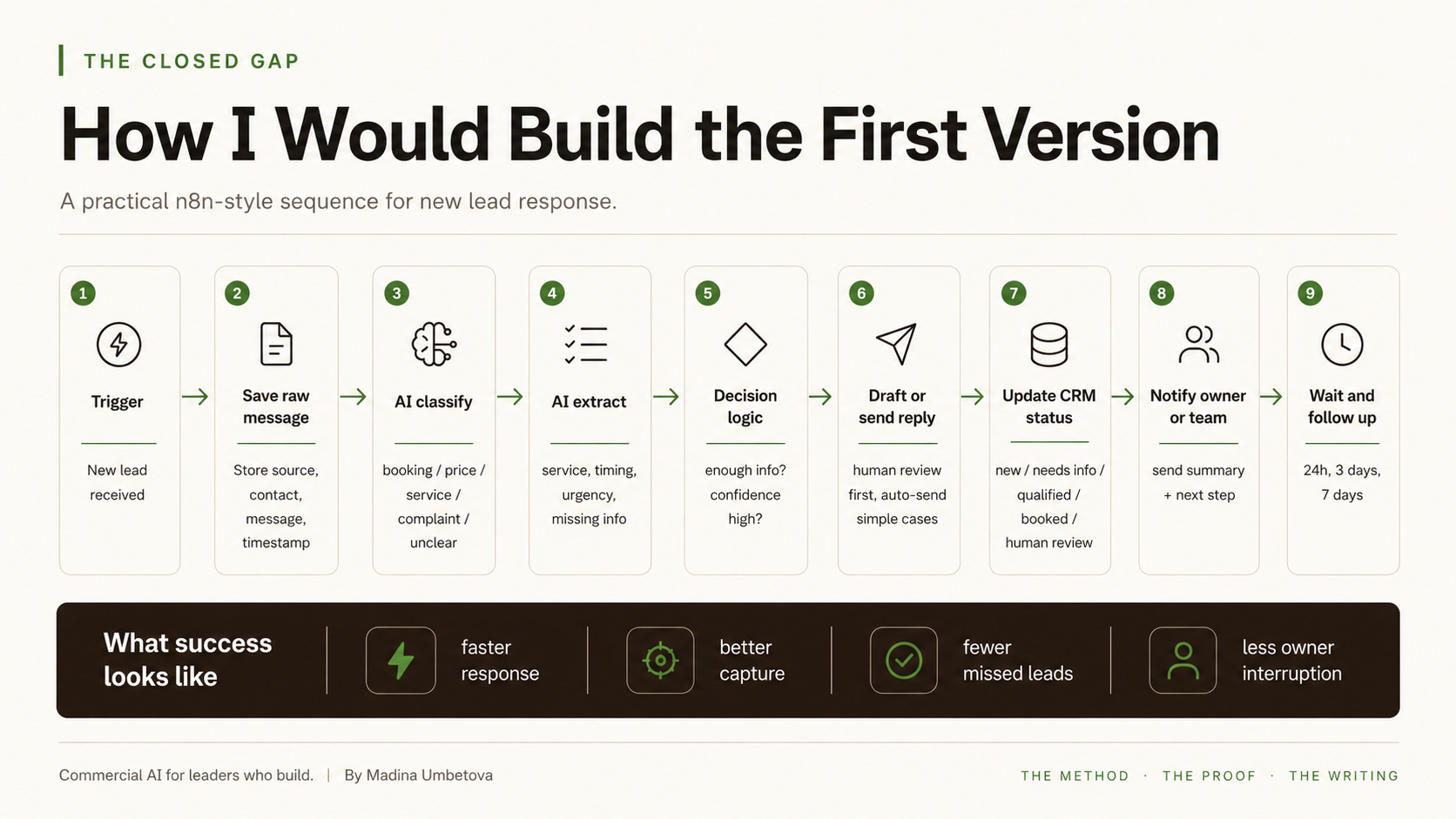
This is the version I would build before anything more sophisticated. Once this works, you can improve it. You can connect calendar availability. You can add booking logic. You can improve CRM fields. You can add lead scoring. You can build different flows for different lead types. You can let AI auto-send simple responses. You can eventually create an agentic workflow with tools and guardrails.
But the first version should be boring enough to trust. That is often the right place to start.
Example: a local service business
Imagine a beauty salon receives this WhatsApp message: Hi, do you have time for highlights this week?
A weak process looks like this: someone sees the message later, replies manually, asks what day, waits, asks hair length, waits, checks the calendar, maybe forgets to follow up, and the lead books somewhere else.
A better workflow looks like this: the message is captured immediately. AI classifies it as a booking request. AI extracts service: highlights, timing: this week. AI sees that hair length and preferred time are missing. The system asks one or two clarification questions. Once information is available, the system sends a booking link or notifies the salon. The lead is saved. If the customer does not reply, a polite follow-up is sent.
The value is not that AI answered a message. The value is that the business created a reliable path from inquiry to booking.
Example: a B2B service business
Now imagine a consulting or agency lead submits this message through a website form: Hi, I saw your post about AI workflows. We are a small agency and need help automating reporting.
A useful workflow could capture the form submission, classify it as a B2B service inquiry, extract the problem (reporting automation), identify missing information (current tools, reporting volume, urgency), draft a warm reply asking three qualification questions, create a CRM record, notify the owner with a summary, suggest the next step (a discovery call), and follow up if the lead does not book.
Again, the value is not only speed. It is better context. The person responding does not have to reconstruct the situation from scratch. The system prepares the conversation.
What success looks like
The first version of this workflow should not be measured by whether it feels impressive. It should be measured by whether it improves the business. I would track:
- response time
- number of leads captured
- number of leads qualified
- number of leads moved to next step
- number of missed leads
- follow-up completion
- owner interruptions
- conversion to booking or call
- quality of lead information
This is where AI ROI starts to become visible.
Start smaller than you think
The temptation with AI is to make everything more advanced than it needs to be. But for many businesses, the first useful system is simple: one channel, one lead type, one database, one AI classification step, one draft reply, one human review rule, one follow-up rule.
That may not sound exciting. But it can be commercially meaningful, because AI value does not always come from the most sophisticated system. It often comes from removing the friction that everyone already tolerates. The delayed reply. The forgotten follow-up. The missing context. The repeated question. The lead stuck in someone's inbox. The owner pulled into every small decision.
This is why new lead response is such a good first AI workflow. It is close to revenue. It is easy to understand. It creates visible operational value. And it teaches the business how to move from tools to workflows. That lesson matters far beyond lead response.
Practical checklist: before you build
Before building your own version, answer these questions:
- Where do new leads arrive today?
- Which channel creates the most friction?
- What are the top three lead types?
- What information do you need from each lead type?
- What makes a lead qualified?
- Which leads should never be handled fully by AI?
- Where should lead information be stored?
- What statuses should a lead move through?
- Who should be notified, and when?
- What follow-up should happen if the lead goes quiet?
Start there. Then build the smallest workflow that removes one real source of friction.
Closing note
AI does not create business value because it can generate a response. It creates value when it helps a business respond, decide, record, follow up, and improve. That is why I would start with new lead response, because it is one of the most useful. And useful is where serious AI adoption begins.